Rearview Camera
The rear view camera system provides a video image of the area behind your vehicle.
During operation, lines appear on the display that represent the path of your vehicle and proximity to objects behind your vehicle.
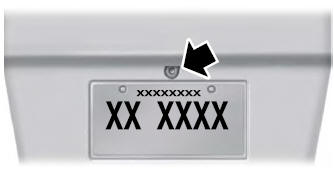
The camera is located on the liftgate of the coupe.
Using the Backup Camera System
The rear view camera system displays what is behind your vehicle when you place the transmission in reverse (R).
The system uses three types of guidelines to help you see what is behind your vehicle:
- Dynamic guidelines: Show the predicted path of your vehicle when backing up.
- Fixed guidelines: Show the actual path your vehicle will travel when backing up in a straight line. This can be useful when backing into a parking space or aligning your vehicle with another object behind you.
- Centerline: Helps align the center of your vehicle with an object (for example, a trailer).
The camera may not function properly under the following conditions:
- Nighttime or dark areas, or if one or both backup lights are not working.
- Dirt, water or debris obstructs the camera view. Clean the lens with a soft, lint-free cloth and a non-abrasive cleaner.
- The rear of your vehicle is damaged or the damage causes the camera to become misaligned.
Camera System Operation
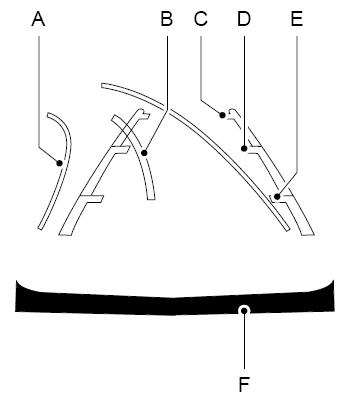
- Active Guidelines
- Centerline
- Fixed guideline: Green zone
- Fixed guideline: Yellow zone
- Fixed guideline: Red zone
- Rear bumper
Dynamic guidelines are displayed only with fixed guidelines. To use dynamic guidelines, turn the steering wheel to direct the guidelines to the intended path. If the steering wheel position changes while backing up, your vehicle may deviate from the original intended path.
Fixed and dynamic guidelines disappear depending on the steering wheel position. Dynamic guidelines are not displayed when the steering wheel position is straight.
Always exercise caution when backing up. Objects in the red zone are closest to your vehicle, and objects in the green zone are farther away. Objects get closer to your vehicle as they move from the green zone into the yellow or red zones. Use the side mirrors and the rearview mirror to get the best coverage on both sides and behind your vehicle.
Camera System Settings
You can access the rear view camera system settings through the display screen.
Advanced Parking Aid Systems or Park Pilot (if equipped)
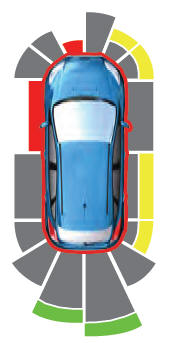
The system uses red, yellow and green highlights that appear over the video image when any of the sensing systems detects an object.
Selectable settings for this feature are ON and OFF.
Manual Zoom
Selectable settings for this feature are Zoom In (+) and Zoom Out (-). Press the symbol on the camera screen to change the view. The default setting is Zoom OFF.
This allows you to get a closer view of an object behind your vehicle. The zoomed image keeps the bumper in the image to provide a reference. Zoom is only active when Reverse (R) is selected.
Rear View Camera Delay
Selectable settings for this feature are ON and OFF.
The default setting for the rear camera delay is off.
When shifting from Reverse (R) to any gear other than Park (P), the camera image remains displayed until:
- Your vehicle speed increases sufficiently.
- You shift your vehicle into Park (P).
Test yourself
A quick Ford Fusion quiz: every answer comes with an explanation and a link to the manual page.