Checking and Maintaining Wiper Blades
- Changing the Front Wiper Blade Rubber
- Changing the Rear Wiper Blade Rubber
Changing the Front Wiper Blade Rubber
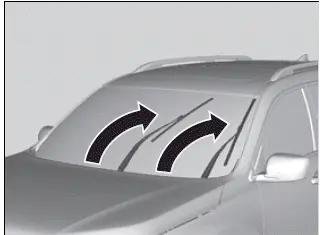
1. Set the power mode to VEHICLE OFF.
2. While holding the wiper switch in the MIST position, set the power mode to ON, then to VEHICLE OFF.
- Both wiper arms are set to the maintenance position as shown in the image.
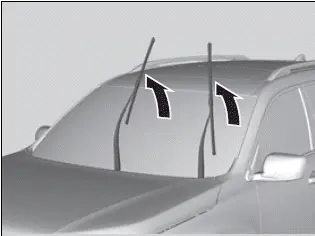
3. Lift both wiper arms.
NOTICE
When lifting the wiper arms, always follow the instructions to move them into the maintenance position.
The wiper arms may be damaged if they are moved manually.
NOTICE
Avoid dropping the wiper arm onto the windshield, as it may damage the wiper arm and/or the windshield.
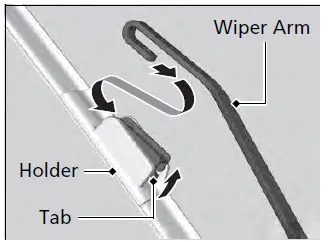
4. Press up on and hold the tab, then slide the holder off the wiper arm.
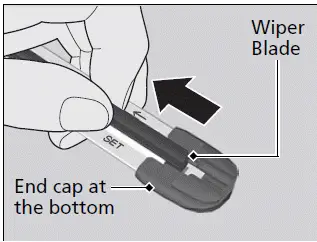
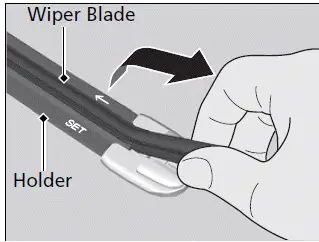
5. Pull the end of the wiper blade in the direction of the arrow in the image until it is out of the holder's end cap.
6. Pull the wiper blade in the opposite direction to slide it out of the holder.
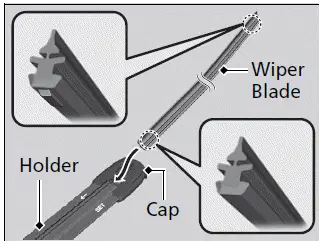
7. Insert the flat side of the new wiper blade onto the bottom part of the holder. Insert the blade all the way.
8. Install the end of the wiper blade into the cap.
9. Slide the holder onto the wiper arm until it locks.
10. Lower both wiper arms.
11. Set the power mode to ON and hold the wiper switch in the MIST position until both wiper arms return to the standard position.
Changing the Rear Wiper Blade Rubber

1. Raise the wiper arm off.
2. Pivot the bottom end of the wiper blade up until it comes off from the wiper arm.
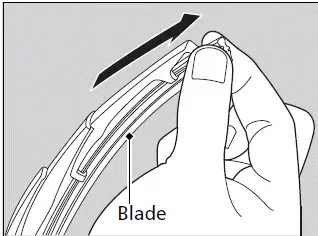
3. Slide the wiper blade out from the end with the indent.

4. Remove the retainers from wiper blade and mount to a new rubber blade.
NOTICE
Avoid dropping the wiper arm, as it may damage the rear window.
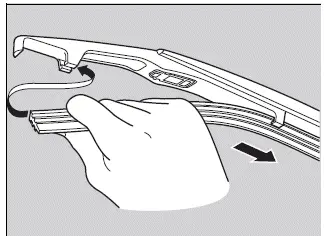
5. Slide the new wiper blade onto the holder.
- Make sure it is engaged correctly, then install the wiper blade assembly onto the wiper arm.
Checking Wiper Blades
If the wiper blade rubber has deteriorated, it will leave streaks and become noisy, and the hard surfaces of the blade may scratch the window glass.