Engine Does Not Start
Checking the Engine
If the engine does not start, check the starter.

If you cannot start the engine after checking all the recommended items, it's essential to have your vehicle checked by a dealer. Professional diagnosis and repair can identify and fix any underlying issues that might be preventing the engine from starting.
If you need to start the vehicle immediately, you can use an assisting vehicle or a booster battery to jump start it. Make sure to follow the proper jump-starting procedure to avoid causing damage to your vehicle's electrical system. Refer to your owner's manual for detailed instructions on how to safely perform a jump start.
In some situations, you may be able to temporarily start the engine using the emergency start procedure. This procedure is detailed in your vehicle's manual and can provide a temporary solution until you can get your vehicle to a dealer for a thorough inspection and repair.
By following these steps, you can address the issue of a non-starting engine and ensure your Honda Pilot is back on the road safely.
If the Keyless Remote Battery is Weak
If the beeper sounds, the To start, touch start button with emblem side of remote message appears on the driver information interface, the ENGINE START/ STOP button flashes, and the engine won't start, start the engine as follows:

1. Press the ENGINE START/STOP button.
- The beeper sounds and the ENGINE START/STOP button flashes for about 30 seconds.
2. Touch the center of the ENGINE START/ STOP button with the H logo on the keyless remote while the ENGINE START/STOP button is flashing. The buttons on the keyless remote should be facing you.
- The beeper sounds, and the ENGINE START/STOP button stays on for about 10 seconds.
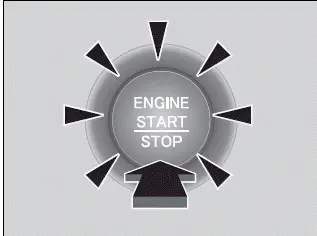
3. Depress the brake pedal and press the ENGINE START/STOP button while the ENGINE START/STOP button is on.
- The engine starts.
- If you don't depress the pedal, the mode will change to ACCESSORY.
Emergency Engine Start
If the engine does not start using the normal engine starting procedure, you may be able to start it using the emergency start procedure below.
Do not use this procedure if it is not an emergency.
1. Make sure the parking brake is applied.
2. Check that the transmission is in (P), then set the power mode to ACCESSORY.
3. Firmly depress the brake pedal and press and hold the ENGINE START/STOP button for at least 15 seconds.
This should be considered a system malfunction even if you are able to start the engine using the above procedure.
Have your vehicle checked by a dealer immediately.
Emergency Engine Stop
The ENGINE START/STOP button may be used to stop the engine due to an emergency situation even while driving. If you must stop the engine, do either of the following operations:
- Press and hold the ENGINE START/STOP button for about two seconds.
- Firmly press the ENGINE START/STOP button three times.
The steering wheel will not lock. However, because turning off the engine disables the power assist the engine provides to the steering and braking systems, it will require significantly more physical effort and time to steer and slow the vehicle. Use both feet on the brake pedal to slow down the vehicle and stop immediately in a safe place.
The gear position automatically changes to (P after the vehicle comes to a complete stop. Then, the power mode changes to VEHICLE OFF.
Do not press the ENGINE START/STOP button while driving unless it is absolutely necessary for the engine to be turned off.
If you press the ENGINE START/STOP button while driving, the beeper sounds.