Multi-View Rear Camera
The 2023 Honda Pilot comes equipped with a multi-view rear camera, providing a rear view of your vehicle on the audio/information screen. This feature is designed to enhance your parking and reversing experience. When you shift the transmission into (R), the display automatically switches to show the rear view. However, it is important to note that the camera's view is limited and does not include the corner ends of the bumper or the area underneath. Additionally, the unique lens may distort the appearance of objects, making them seem closer or farther than they actually are.
Safety ConsiderationsFor optimal safety, always visually confirm that it is safe to drive before backing up. While the rear camera is a helpful tool, it should not be solely relied upon. Weather conditions, lighting, and high temperatures can affect the clarity of the rear view. It is crucial to use the camera in conjunction with your mirrors and direct line of sight, as it does not provide complete information about the conditions behind your vehicle.
MaintenanceTo ensure the rear camera functions correctly, it is essential to keep the lens clean. If the lens becomes covered with dirt or moisture, activate the rearview camera washer or clean it with a soft, moist cloth. Keeping the lens free of debris will maintain clear visibility.
SettingsThe 2023 Honda Pilot allows you to adjust the Fixed Guideline and Dynamic Guideline settings. These adjustments can help tailor the rear camera display to better suit your parking and maneuvering needs.
By understanding these features and limitations, you can effectively utilize the multi-view rear camera in your 2023 Honda Pilot, enhancing safety and precision when reversing.
Fixed Guideline
ON: Guidelines appear when you put the transmission into (R).
OFF: Guidelines do not appear.
Dynamic Guideline
ON: Guidelines move according to the steering wheel direction.
OFF: Guidelines do not move.
If the vehicle's rear view is not displayed on the audio/ information screen while the shift position is in (R), there may be a problem with the system. Have your vehicle checked by a dealer immediately.
If the vehicle's rear view is not displayed on the audio/ information screen while the shift position is in (R), there may be a problem with the system. Have your vehicle checked by a dealer immediately.
■ Multi-View Rear Camera Display Area

You can view three different camera modes on the audio/information screen.
Touch the appropriate icon to switch the mode.
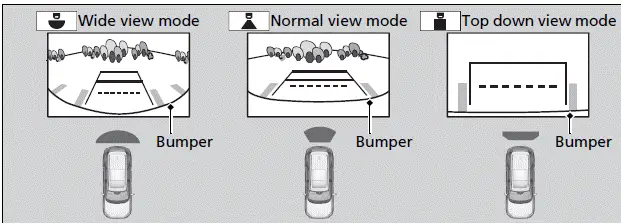
- If you were last using Wide view mode or Normal view mode, the same view mode will be activated the next time you put the transmission into (R).
- If you were using Top down view mode before you turned off the engine, Wide view mode will be activated the next time you set the power mode to ON and put the transmission into (R).
- If you were using Top down view mode and 10 seconds elapsed after you took the transmission out of (R), Wide view mode will be activated the next time you put the transmission into (R).
- If you were using Top down view mode and put the transmission back into (R) within 10 seconds after you took it out of (R), Top down view mode will be activated.