Climate Control System
- Using Automatic Climate Control
- Rear Climate Control System
Using Automatic Climate Control
The Honda Pilot 2023 features an automatic climate control system that maintains your selected interior temperature. This system efficiently adjusts the mix of heated or cooled air to quickly achieve and maintain your preferred climate inside the vehicle.
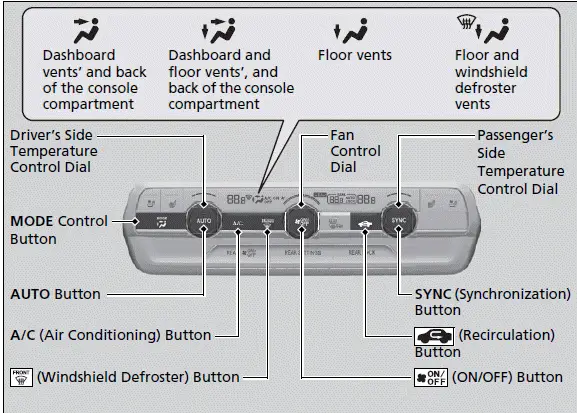
Use the system when the engine is running.
1. Press the AUTO button.
2. Adjust the interior temperature using the driver's side or passenger's side temperature control switch.
3. Press the  (ON/OFF) button to cancel.
When using the automatic climate control system in the Honda Pilot 2023, pressing any button will give priority to that specific function, and the AUTO indicator will turn off. However, all other functions not related to the pressed button will continue to operate automatically.
During idle-stops, the air-conditioning is suspended, and only the blower remains active. To keep the air-conditioning running during idle-stops, press the Auto Idle Stop OFF button to cancel the idle-stop.
To prevent cold air from blowing in from outside, the fan may not start immediately when the AUTO button is pressed. If the interior is very warm, you can cool it down more quickly by partially opening the windows, turning the system to auto, and setting the temperature to low. Switch the fresh air mode to recirculation mode until the temperature cools down.
When you set the temperature to its lower or upper limit, "Lo" or "Hi" will be displayed.
Pressing the  button switches the climate control system between on and off. When turned on, the system returns to your last selection.
When you unlock the doors with your remote, the driver's ID (DRIVER 1 or DRIVER 2) is detected, and the climate control settings are turned to the respective mode automatically when you set the power mode to ON.
Switching between the recirculation and fresh air modes
Press the  (recirculation) button and switch the mode depending on environmental conditions.
Recirculation mode (indicator on): Recirculates air from the vehicle's interior through the system.
Fresh air mode (indicator off): Maintains outside ventilation.
■ Defrosting the Windshield and Windows
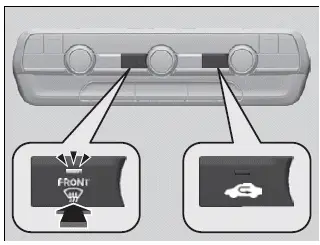
Pressing the button  turns the air conditioning system on and automatically switches the system to fresh air mode.
Press the  button again to turn off, the system returns to the previous settings.
For your safety, make sure you have a clear view through all the windows before driving.
Do not set the temperature near the upper or lower limit.
When cold air hits the windshield, the outside of the windshield may fog up.
If you press the  button during Auto Idle Stop, the engine restarts automatically.
To rapidly defrost the windows
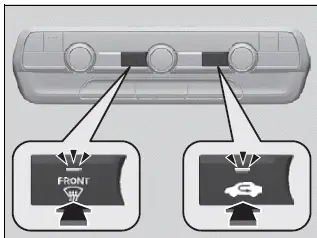
1. Press the  button.
2. Press the  button.
After defrosting the windows, switch over to fresh air mode.
If you keep the system in recirculation mode, the windows may fog up from humidity. This impedes visibility.
■ Synchronization Mode

You can set the temperature synchronously for the driver's side, passenger's side and rear in synchronization mode.
1. Press the SYNC button.
- The SYNC indicator will come on.
- The system switches to synchronization mode.
2. Adjust the temperature using the driver's side temperature control switch.
Press the SYNC button, adjust the interior temperature using the passenger's side temperature control switch or changing the rear temperature to return to dual mode.
When you press the  button, the system changes to synchronization mode.
When the system is in dual mode, the driver's side temperature, the passenger's side temperature, and the rear temperature can be set separately.
Rear Climate Control System
Models with REAR LOCK button
When the rear lock is activated in the Honda Pilot 2023, "LOCK" appears on the rear control panel. If the rear lock is on while in SYNC mode, the rear control panel is disabled, and "SYNC LOCK" appears on the display.
■ Using the Rear Climate Control System From the Front Panel
You can manage the rear climate control system from the front panel, ensuring that all passengers experience optimal comfort.
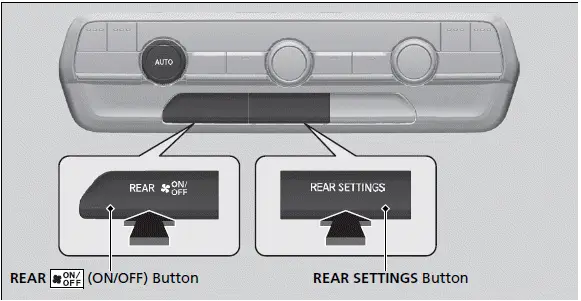
Use the system when the engine is running and the climate control system is operating.
1. Press the REAR  (ON/OFF) button.
2. Press the REAR SETTINGS button.
- The system switches to the rear control mode for 10 seconds. The REAR indicator appears on the display.
3. Press the AUTO button.
- The rear system changes to AUTO mode.
- The system automatically adjusts the fan speed and airflow levels to maintain the set rear temperature. Change the temperature if necessary.
4. To turn off the rear climate control system, press the REAR  (ON/OFF) button.
Models with REAR LOCK button
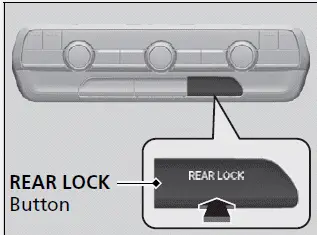
Press the REAR LOCK button to turn the rear lock mode on and off.
While the rear lock mode is on, the rear control panel is disabled.
- The LOCK indicator will come on.
■ Using the Rear Climate Control System From the Rear Panel
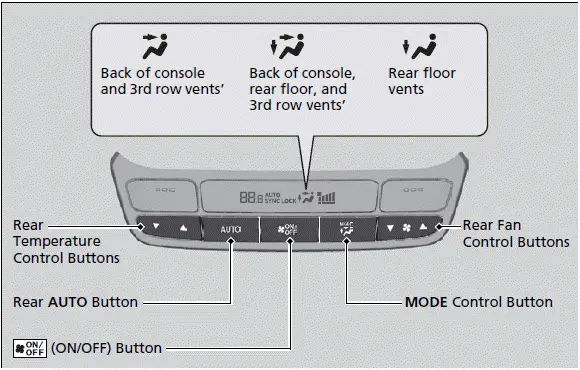
Use the system when the engine is running
1. Press the rear AUTO button.
2. Adjust the interior temperature using the rear temperature control button.
3. To turn off the rear climate control system, press  (ON/OFF) button.
Models with REAR LOCK button
When the rear lock mode is off, the temperature of the rear passenger compartment can be controlled independently.
Automatic Climate Control Sensors
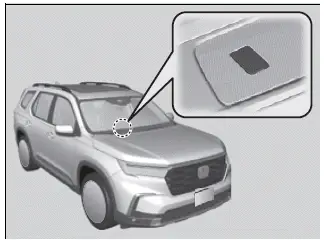
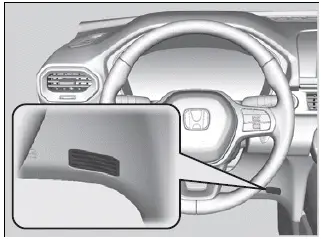
The automatic climate control system is equipped with sensors. Do not cover or spill any liquid on them.