Clock

In this manual: Clock
Visual Index — 1Auto Idle Stop Function — 1Safe Driving — 1Instrument Panel — 1Controls — 1Features — 1Driving — 1Honda Sensing System — 1Maintenance — 1Handling the Unexpected — 1For Safe Driving — 1Seat Belts — 1Airbags — 1Child Safety — 1Exhaust Gas Hazard — 1Indicators — 1Gauges and Displays — 1Clock — 1Locking and Unlocking the Doors — 1Tailgate — 1Security System — 1Windows — 1Panoramic Roof — 1Operating the Switches Around the Steering Wheel — 1Mirrors — 1Seats — 1Interior Convenience Items — 1Climate Control System — 1Audio System — 1Audio System Basic Operation - Models with 7-in. Color Touchscreen — 1Audio System Basic Operation - Models with 9-in. Color Touchscreen — 1Customized Features - Models with 7-in. Color Touchscreen — 1Customized Features - Models with 9-in. Color Touchscreen — 1HomeLink Universal Transceiver — 1Bluetooth HandsFreeLink - Models with 7-in. Color Touchscreen — 1Bluetooth HandsFreeLink - Models with 9-in. Color Touchscreen — 1Refuel Recommend — 1Before Driving — 1Towing a Trailer — 1Off-Highway Driving Guidelines — 1When Driving — 1Honda Sensing — 1Braking — 1Parking Your Vehicle — 1Multi-View Rear Camera — 1Surround View Camera System — 1Refueling — 1Fuel Economy and CO2 Emissions — 1Before Performing Maintenance — 1Maintenance Minder — 1Maintenance Under the Hood — 1Replacing Light Bulbs — 1Checking and Maintaining Wiper Blades — 1Battery — 1Remote Transmitter Care — 1Climate Control System Maintenance — 1Cleaning — 1Accessories and Modifications — 1Tools — 1Engine Does Not Start — 1If the Battery Is Dead — 1Overheating — 1Indicator Coming On/Blinking — 1Fuses — 1Emergency Towing — 1Refueling — 1Specifications — 1Identification Numbers — 1Emissions Testing — 1
~2min read

Adjusting the Clock

You can adjust the time in the clock display with the power mode in ON.

The clock is automatically updated through the audio system.

Models with 7-in. Color Touchscreen

You can also select and enter with the selector knob instead of the touch panel.

■ Adjusting the Time

Models with 7-in. Color Touchscreen
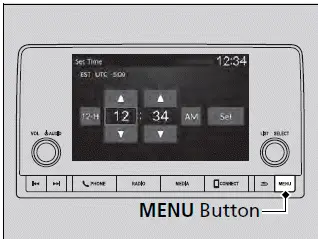
Adjusting the Clock - Honda Pilot 2023

1. Press the MENU button.

2. Select Clock Settings.

3. Select Automatic Time, then select OFF.

4. Select Set Time.

5. Select 12H/24H to change 12 or 24 hour clock.

6. Select or .

7. Select Set to set the time.

Models with 9-in. Color Touchscreen
Adjusting the Clock

1. Press the button.

2. Select General Settings.

3. Select System.

4. Select Date & Time.

5. Select Set Date & Time.

6. Select Automatic Date & Time, then select OFF.
Adjusting the Clock

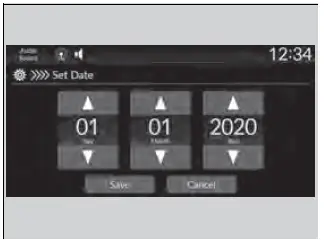
To adjust date:

7. Select Set Date.

8. Select or .

9. Select Save to set the date.

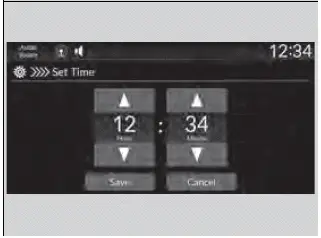
To adjust time:

7. Select Set Time.

8. Select or .

9. Select Save to set the time.

Models with 9-in. Color Touchscreen

You can also adjust the clock by touching the clock displayed on the header area of the audio/ information screen, Clock displayed on the home screen, or All Apps.

1. Touch the clock on the screen.

The clock screen of the face-type appears.

2. Select Settings.

3. Select Date & Time.

4. Select Set Date & Time.

5. Select Automatic Date & Time, then select OFF.

6. Select Set Date or Set Time.

7. Adjusting the dates, hours, and minutes by selecting or .

8. Select Save to set the time.

You can customize the clock display to show the 12 hour clock or 24 hour clock.

You can customize the date display to MM/DD/ YYYY, DD/MM/YYYY, or YYYY/MM/DD.