Driving Your Vehicle
Sport Mode
In this manual: Driving Your Vehicle
~1min read
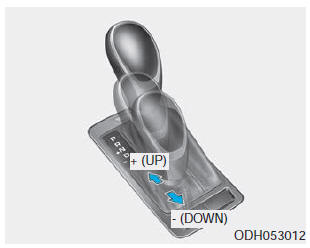
Regardless of whether the vehicle is stationary or moving, Sport mode is selected by pushing the shift lever from the D (Drive) position into the manual gate. To return to D (Drive) range operation, return the shift lever to the main gate.
In Sport mode, moving the shift lever forward and backward allows you to select the desired gear range for the current driving conditions.
+ (Up): Push the lever forward once to shift up one gear.
- (Down): Pull the lever back once to shift down one gear.
✽ NOTICE
- Only forward gears 1 through 8 can be selected. For reversing or parking the vehicle, move the shift lever to R (Reverse) or P (Park) as required.
- Downshifting occurs automatically when the vehicle decelerates. When the vehicle stops, 1st gear is selected automatically.
- When the engine speed approaches the red zone, the transmission will upshift automatically.
- If the driver pushes the lever to + (Up) or - (Down), the transmission may not perform the requested shift if the next gear is outside the allowable engine speed range. The driver should shift to a higher gear according to road conditions, keeping engine speed below the red zone.
- When starting off on a slippery road, push the shift lever forward to the + (Up) position. This causes the transmission to shift to 2nd gear, which is better for smooth driving on slippery roads. Push the shift lever toward - (Down) to return to 1st gear.
Test yourself
A quick Hyundai Genesis DH quiz: every answer comes with an explanation and a link to the manual page.
Was this page helpful?