Convenient Features of Your Vehicle
Surround View Monitor
In this manual: Convenient Features of Your Vehicle
~1min read
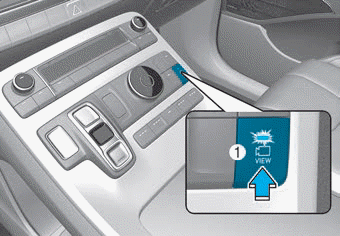
The Surround View Monitor system can help with parking by allowing the driver to see around the vehicle.
Press the button (1, ON indicator) to operate the system. To cancel the system, press the button (1) again (indicator off).
The system is activated when:
- Engine running
- Shift lever is in D (Drive), N (Neutral), or R (Reverse)
- Vehicle speed is below 10 mph (15 km/h)
The system is deactivated when:
- The button (1) is pressed again
- Vehicle speed exceeds 10 mph (15 km/h)
Information
- When the vehicle speed exceeds 10 mph (15 km/h), the system will turn off. The system will not turn back on automatically, even if the vehicle speed drops below 15 km/h. Press the button (1, indicator on) again to turn the system on.
- When the vehicle is driven in reverse, the system will turn on regardless of vehicle speed or button status. However, if the vehicle speed exceeds 15 km/h while driving forward, the SVM system will turn off.
- A warning appears on the display when: - The rear door is open - The driver's door is open - The passenger's door is open - The outside rearview mirror is folded
- If the system does not operate normally, have the system inspected by an authorized HYUNDAI dealer.
CAUTION
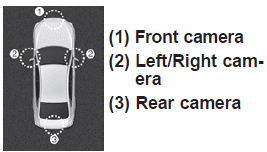
The Surround View Monitor system is only intended to assist the driver when parking. ALWAYS look around your vehicle to make sure there are no objects or obstacles before moving the vehicle.
NOTICE
Always keep the camera lens clean. The camera may not operate normally if the lens is covered with foreign material.
Test yourself
A quick Hyundai Palisade quiz: every answer comes with an explanation and a link to the manual page.
Was this page helpful?