Smart Liftgate
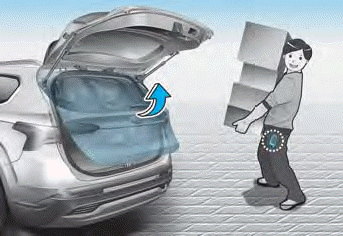
On a vehicle equipped with a smart key, the liftgate can be opened by hands-free activation of the smart liftgate system.
Using the Smart Liftgate
The hands-free smart liftgate can open automatically when the following conditions are met:
- The "Smart Liftgate" option is turned on in the Settings menu of the infotainment system screen.
- The smart liftgate is activated and ready 15 seconds after all doors are closed and locked.
- The smart liftgate will open when the smart key is detected in the area behind the vehicle for 3 seconds.
Information
The smart liftgate will NOT operate if:
- The door is not locked and closed.
- The smart key is detected within 15 seconds after the doors have been closed and locked.
- The smart key is detected within 15 seconds after the doors have been closed and locked, and within 60 in. (1.5 m) of the front door handles (for vehicles equipped with welcome light).
- The smart key is inside the vehicle.
1. Settings
To activate the Smart Liftgate, enter the user settings mode and select Smart Liftgate on the LCD display.
2. Detection and Warning
The smart liftgate detection zone extends approximately 20–40 in. (50–100 cm) behind the vehicle. If you are within the detection zone and carrying the smart key, the hazard warning lights will flash and the buzzer will sound to warn you that the smart liftgate will open.
Information
Do not approach the detection zone if you do not want the liftgate to open. If you unintentionally enter the detection zone and the hazard warning lights and buzzer start operating, move away from the area behind the vehicle with the smart key. The liftgate will remain closed.
3. Automatic Opening
After the hazard warning lights flash and 6 buzzer sounds, the smart liftgate will open.
Test yourself
A quick Hyundai Santa Fe quiz: every answer comes with an explanation and a link to the manual page.