LCD Screen Warning (if equipped)
Key Not in Vehicle
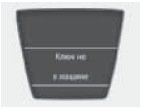
If the smart key is not inside the vehicle and any door is opened or closed while the ignition switch is in the ACC, ON, or START position, a warning message appears on the LCD screen.
A warning chime sounds for 5 seconds when the smart key is not inside the vehicle and any door is closed. Turn off the ignition or bring the smart key into the vehicle.
Key Not Detected
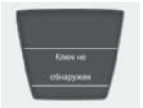
If the smart key is not inside the vehicle or is not recognized, this warning message appears on the LCD screen for 10 seconds when the engine START/STOP button is pressed.
Smart Key Battery Discharged

When the battery of the smart key inside the vehicle is discharged, this warning message appears on the LCD screen for 10 seconds.
Replace the battery. If this is not possible, the engine can be started by inserting the smart key into the holder and pressing the engine START/STOP button.
Press Brake Pedal to Start Engine (automatic transmission)

If the ignition is switched to ACC twice and the engine START/STOP button is pressed without depressing the brake pedal, this warning message appears on the LCD screen for 10 seconds to indicate that the brake pedal must be pressed to start the engine.
Press Clutch Pedal to Start Engine (manual transmission)

If the ignition is switched to ACC twice and the engine START/STOP button is pressed without depressing the clutch pedal, this warning message appears on the LCD screen for 10 seconds to indicate that the clutch pedal must be pressed to start the engine.
Shift Transmission to P
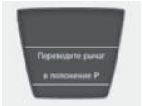
If the engine START/STOP button is pressed with the ignition on and the shift lever is not in P (Park), this warning message appears on the LCD screen for 10 seconds, indicating that the shift lever must be in P (Park) to stop the engine by pressing the engine START/STOP button.
Press START Button with Smart Key Present

If the engine START/STOP button is pressed when the LCD screen displays the message "Key is not detected", this warning message appears for 10 seconds.
Press START Button Again
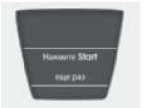
If a malfunction occurs in the Engine Start/Stop button system, a warning will appear for 10 seconds indicating that the engine can be started by pressing the Engine Start/Stop button while depressing the brake pedal. If the warning appears every time the Engine Start/Stop button is pressed, have the system inspected by an authorized HYUNDAI dealer.
To start the engine, move the shift lever to the "P" or "N" position.
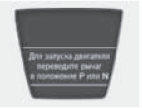
If you try to start the engine when the shift lever is not in the P (Park) or N (Neutral) position, this warning will appear on the LCD screen for 10 seconds. The engine can be started with the shift lever in the N (Neutral) position; however, for safety reasons, it is recommended to start the engine with the shift lever in the P (Park) position.
Press the start button while turning the steering wheel.
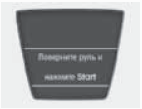
When the steering wheel is not unlocked, this warning will appear on the LCD screen for 10 seconds.
Check the steering wheel lock.
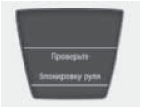
When the steering wheel is not locked, this warning will appear on the LCD screen for 10 seconds.
Steering wheel unlocked.
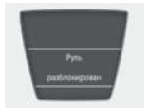
When the steering wheel is not locked, this warning will appear on the LCD screen for 10 seconds.
Check the stop lamp fuse.
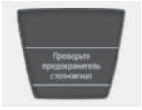
When the stop lamp fuse is blown, a warning will light up on the LCD display for 10 seconds.
Replace the fuse with a new one. If this is not possible, you can start the engine by pressing the ENGINE START/STOP button for 10 seconds in ACC mode.
Test yourself
A quick Hyundai Solaris quiz: every answer comes with an explanation and a link to the manual page.