Meter Operation Inspection
Check 1-1: Switching Inspection
- Turn the ignition switch to ON and check the following.
The all LCD segments [A] appear for 3 seconds.
The warning indicator light (Red LED) [B] goes on for 3 seconds and then goes off in a moment after that goes off.
The warning indicator light (Yellow LED) [C] goes on for 3 seconds.
The fuel level (ZX1000J model) or ABS (ZX1000K model) warning indicator light (LED) [D] goes on.
The tachometer (LED) [E] blinks 3 times.

If the meter does not work, replace the meter unit.
- Refer to the Meter Unit Inspection for other indicator lights (LED) inspection.
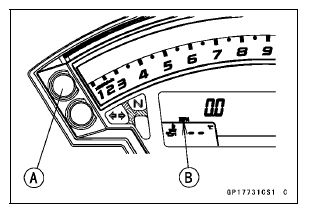
- By pushing the upper button [A] each time, check that the display [B] changes as follows.
This display is ordinary indication. 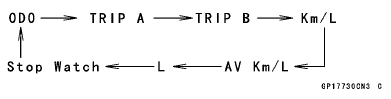
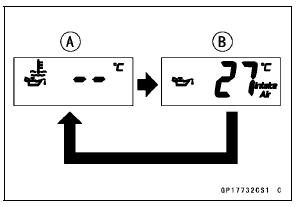
- By pushing the lower button each time, check that the display changes water temperature [A] and intake air temperature [B].
If the meter does not work, replace the meter unit.
- Indicate the Stop Watch mode.
- By pushing the upper button each time, check that the display position changes as shown.
If meter does not work, replace the meter unit.
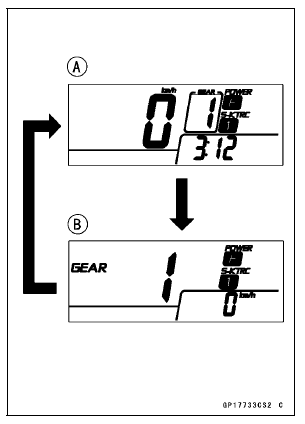
Normal Mode [A] Race Mode [B]
- Indicate the ODO mode.
- Check that the display [A] change to the “km/h” and “mph” display each time by pushing the lower button while upper button pushed in.
NOTE
Mile/Km Display can alternate between English and metric modes (mile and km) in the digital meter. Make sure that km or mile according to local regulations is correctly displayed before riding.
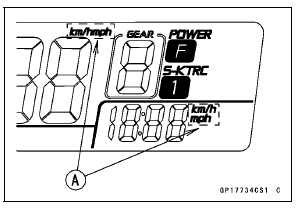
If the display function does not work, replace the meter unit.
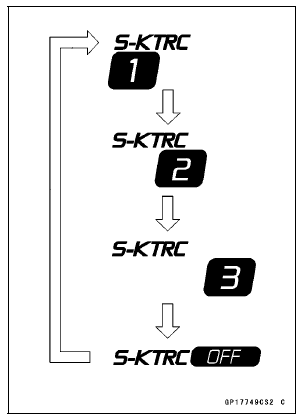
- By pushing (0.3 ∼ 0.4 seconds) the S-KTRC button [A] at the left handlebar switch housing each time, check that the S-KTRC indicator symbol changes to going on.
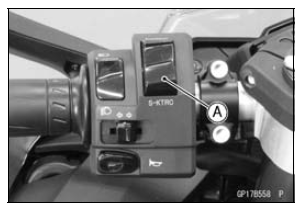
If the indicator symbol does not work, check the following parts.
S-KTRC Button (see Switch Inspection) Wiring (see Meter Unit Circuit)
If the above parts is good, replace the meter unit and/or ECU.
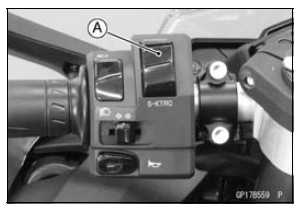
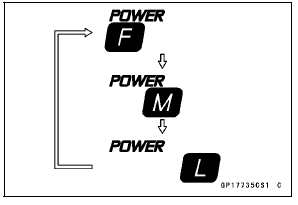
- By pushing (0.3 ∼ 0.4 seconds) the power mode button [A] at the left handlebar switch housing each time, check that the power mode symbol changes to going on.
If the display function does not work, check the following parts.
Power Mode Button (see Switch Inspection) Wiring (see Meter Unit Circuit)
If the above parts is good, replace the meter unit and/or ECU.
Check 1-2: Gear Position Indication Inspection
- Turn the ignition switch to ON.
The neutral indicator light (LED) [A] goes on when the transmission gear is neutral position.
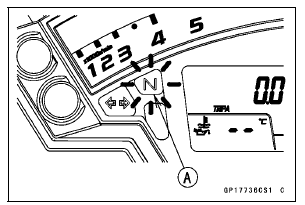
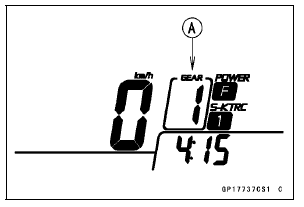
- Set the low gear position, and check that the display changes to 1 mark [A] and the neutral indicator light (LED) goes off.
If the display function does not work, check the following parts.
Gear Position Switch (see Gear Position Switch Inspection) Wiring (see Meter Unit Circuit)
If the above parts is good, replace the meter unit and/or ECU.
Test yourself
A quick Kawasaki Ninja ZX-10R quiz: every answer comes with an explanation and a link to the manual page.