Driving Your Vehicle
Blind-Spot View Monitor (BVM)
In this manual: Driving Your Vehicle
~1min read
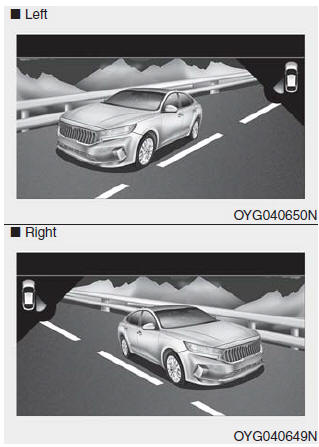
The Blind-View Monitor displays the rear and side view of the vehicle on the center cluster screen when the driver activates the turn signal.
To enable BVM: BVM is enabled in the settings
(1) Engine Start/Stop button is in the ON position.
(2) Turn signal is activated. (When the hazard warning switch is pressed, BVM is deactivated.)
To disable BVM
(1) Engine Start/Stop button is in the OFF position.
(2) Turn signal is deactivated.
(3) A warning screen appears and takes priority over BVM.
WARNING
- The Blind-View Monitor is only a supplementary system. It is the driver's responsibility to always check the area around the vehicle ahead of and when turning or changing lanes.
- ALWAYS look around the vehicle to make sure there are no objects or obstacles before moving the vehicle in any direction to prevent a collision.
- Objects appear closer than they are. Failure to visually confirm that it is safe to change lanes before doing so may result in an accident and serious injury or death.
- Always keep the camera lens clean. The camera may not operate properly if the lens is covered with foreign material.
Test yourself
A quick Kia Cadenza VG Owner's Manual quiz: every answer comes with an explanation and a link to the manual page.
Was this page helpful?