Lead Vehicle Departure Alert
This system alerts the driver when the lead vehicle departs after stopping.
Feature Setting
When the vehicle is on, the Lead Vehicle Departure Alert feature is turned on and ready to activate when "Settings > Vehicle > Driver Assistance > Driver Attention Warning > Lead Vehicle Departure Alert" is selected. The feature stops operating when the setting is deactivated. However, if the vehicle is turned off and then turned on again, the feature maintains its previous state.
For more details, please scan the QR code in the separately supplied Vehicle Infotainment System Quick Reference Guide.
Operating Conditions
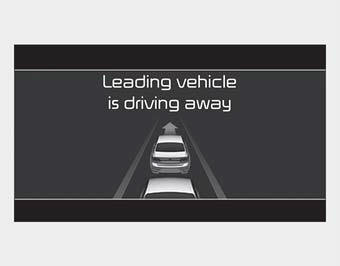
If the driver does not take action within a certain period of time after the vehicle ahead departs, a message is displayed on the cluster with a warning sound.
WARNING
- The Driver Assistance feature is a supplementary device and may not alert the driver even after the lead vehicle departs.
- Even if the Lead Vehicle Departure Alert feature is active, always check the traffic condition yourself before driving the vehicle.
CAUTION
- The Lead Vehicle Departure Alert feature uses the forward view camera mounted on the windshield for its operation. To keep the forward view camera in the best condition, refer to "Lane Keeping Assist (LKA)".
- The feature may not operate for 15 seconds after the engine is started or the forward view camera is initialized.
✽ NOTICE
The feature may not alert or may not operate properly when:
- A pedestrian or bicycle is ahead.
- A vehicle cuts in ahead.
- Traffic jam is encountered during curve or right turn driving.
- On a busy road, such as a lane reduction.
- Stopped on the shoulder, rest area, or parking lot.
- If the vehicle head makes a sudden start or U-turn.
- If the vehicle is stopped on a speed bump or slope.
Test yourself
A quick Kia Cadenza VG Owner's Manual quiz: every answer comes with an explanation and a link to the manual page.