Smart Cruise Control (SCC)
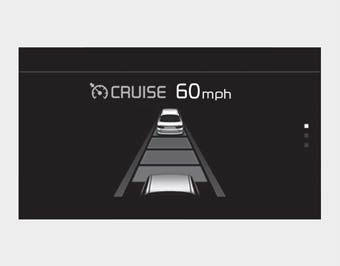
➀ Cruise indicator ( CRUISE)
➁ Set speed
➂ Progress
Smart Cruise Control allows the vehicle to be programmed to maintain a constant speed and a set distance to the vehicle ahead, without pressing the accelerator or brake pedal.
To view the SCC screen on the LCD display in the cluster, select Driving Assist ( ). For more information, refer to "LCD Display Modes" in Chapter 4.
WARNING
For your safety, read the owner's manual before using Smart Cruise Control.
✽ NOTICE
To activate Smart Cruise Control, press the brake pedal at least once after setting the ENGINE START/STOP button to the ON position or starting the engine. This is to check that the brake switch, which is an important part of canceling Smart Cruise Control, operates normally.
Test yourself
A quick Kia Cadenza VG Owner's Manual quiz: every answer comes with an explanation and a link to the manual page.