Bluetooth® Wireless Technology Settings
The Bluetooth® word mark and logos are registered trademarks owned by Bluetooth SIG, Inc., and any use of such marks by Kia is under license. Other trademarks and trade names are those of their respective owners. A Bluetooth®-enabled mobile phone is required to use Bluetooth® Wireless Technology.
WARNING
Driving while distracted can result in loss of vehicle control that may lead to an accident, severe personal injury, and death. The primary responsibility of the driver is the safe and legal operation of the vehicle. Portable devices, other equipment, or vehicle systems that take the driver's eyes, attention, and focus away from the safe operation of the vehicle, or that are illegal, should never be used while driving the vehicle.
Pairing a New Device
press Press the key, select [Phone], then select [Connect Phone]
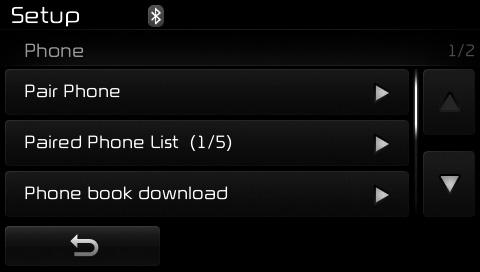
Bluetooth® wireless technology devices can be paired with the audio system.
For more information, refer to the "Pairing via Phone Settings" section in Bluetooth® Wireless Technology.
Viewing the Paired Phone List
pressPress the key, select [Phone], then select [Paired Phone List]
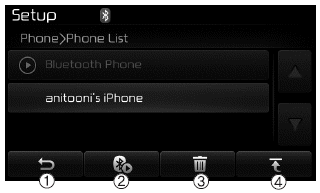
This function is used to view mobile phones that have been paired with the audio system. When a paired phone is selected, the setup menu is displayed.
For more information, refer to "Bluetooth® Wireless Technology Connection Setup" in Bluetooth® Wireless Technology.
1)  : Returns to the previous screen.
2) Connect/Disconnect Phone: Connects/disconnects the currently selected phone.
3) Delete: Deletes the currently selected phone.
4) Change Priority: Sets the currently selected phone to the highest connection priority.
✽ NOTICE - BEFORE DOWNLOADING PHONEBOOK
- Only phonebooks in connected phones can be downloaded. Also make sure that your mobile phone supports the download function.
- To find out whether your mobile phone supports the phonebook download function, refer to the mobile phone's user manual.
- Only the phonebook of a connected phone can be downloaded. Before downloading, check whether your phone supports the download function.
Downloading Phonebooks
pressPress the key. Select [Phone], then select [Download Phonebook].
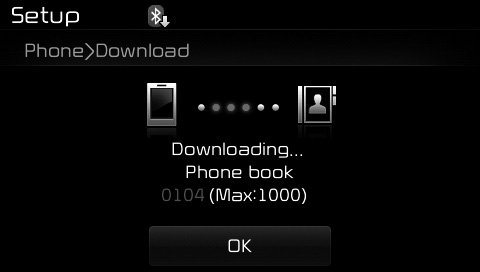
The phonebook is downloaded from the mobile phone and the download progress is displayed.
✽ NOTICE
- Up to 1000 phonebook entries can be copied to the vehicle phonebook.
- Up to 1000 phonebook entries can be stored for each paired device.
- When downloading the phonebook, previously stored phonebook data will be deleted. However, phonebook entries stored in other paired phones are not deleted.
Test yourself
A quick Kia Cee'd quiz: every answer comes with an explanation and a link to the manual page.