Trip Mode (A, B)
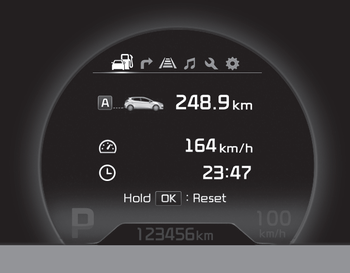
This mode shows 3 types of driving information.
All stored driving information (except the odometer, distance to empty and instant fuel economy) is reset when the battery is disconnected.
1. Odometer (km or miles)
This mode displays the distance of individual trips selected since the trip odometer was last reset.
The odometer operating range is from 0.0 to 9999.9 km (from 0.0 to 9999.9 miles).
Press Press and hold the button for longer than 1 second to reset the trip odometer to zero (0.0).
2. Average Speed (km/h or mph)
This mode calculates the average vehicle speed since the average speed was last reset.
Even if the vehicle is not moving, the average speed is retained while the engine is running.
PressPress and hold the button for more than 1 second. When the average speed is displayed, it resets the average speed (---).
3. Trip Time
This mode shows the total driving time since the last driving time reset.
Even if the vehicle is not moving, the driving time continues to count while the engine is running.
The operating range of the timer is 0:00 to 99:59.
PressPress and hold the button for more than 1 second. When the driving time is displayed, it resets the driving time (0:00).
Test yourself
A quick Kia Cee'd quiz: every answer comes with an explanation and a link to the manual page.