User Settings
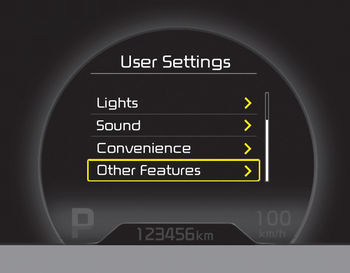
1. Stop the vehicle, turn the ignition switch to the ON position or start the engine.
2. Press the button until the User Settings mode is displayed.
3. You can change an item by pressing the ▼ button and select the item by pressing the button.
Door Menu
• Auto Door Lock
Off - The automatic door lock operation will be cancelled.
Speed - All doors will lock automatically when the vehicle speed exceeds 15 km/h.
Shift Lever - All doors will lock automatically if the shift lever is moved from the P (Park) position to the R (Reverse), N (Neutral) or D (Drive) position. (For automatic transaxle shift lever)
• Auto Door Unlock
Off - The automatic door unlock operation will be cancelled.
Key Out - All doors will unlock automatically when the ignition key is removed from the ignition switch (or the smart key is out of the vehicle).
Shift Lever - All doors will unlock automatically when the shift lever is moved to the P (Park) position. (For automatic transaxle shift lever)
Lamp Menu
• Headlamp Delay (if equipped)
If the headlamp delay function is checked: The headlamp delay and welcome light function will be activated.
• Auto Triple Turn (one-touch triple turn signal)
If Auto Triple Turn is selected: The lane change signals will flash 3 times when the turn signal lever is moved slightly.
• Welcome Light (if equipped)
If the welcome light function is enabled: The welcome light puddle lamp function will be activated.
Convenience Menu
• Easy Access Seat (for driver's seat memory system vehicles) (if equipped)
If the easy access seat function is checked:
The driver's seat will move forward or backward automatically so the driver can enter or exit the vehicle comfortably.
• Welcome Sound
If Welcome Sound is enabled: The welcome sound function will be activated.
• Steering Wheel Position (if equipped)
If the steering wheel position function is checked:
A warning appears on the LCD display when the steering wheel is not aligned with the ENGINE START/STOP button in the ON position.
• AVG ECO Fuel Reset
Auto Reset - The average fuel economy is automatically reset when you drive after refueling.
Manual Reset - The average fuel economy is not automatically reset when you drive after refueling. You can reset the average fuel economy by pressing and holding the button for more than 1 second when the average fuel economy is displayed.
• Speedometer Scale (if equipped)
- 100%: The size of the numbers on the speedometer in the normal state.
- 110%: The size of the numbers on the speedometer will increase.
• Unit
You can select the unit displayed on the instrument cluster: "km" or "mile".
• Language
Select the language you prefer on the LCD display.
Test yourself
A quick Kia Cee'd quiz: every answer comes with an explanation and a link to the manual page.