Driving Your Vehicle
FCA Sensor (Front View Camera)
In this manual: Driving Your Vehicle
~1min read
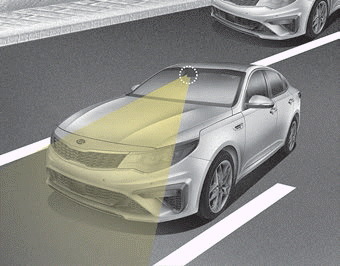
For the FCA system to operate properly, always keep the sensor clean and free of dirt, snow, and debris.
Dirt, snow, or foreign substances on the sensor's external parts may adversely affect sensor sensitivity.
✽ NOTICE
- Never install any accessories or stickers on the windshield, and never tint the windshield.
- Never place reflective objects (such as white paper or a mirror) on the instrument panel. Any light reflection may cause a system malfunction.
- Make sure the front view camera does not get wet.
- Never disassemble the camera assembly or subject the camera assembly to any impact.
- Playing the vehicle audio system at high volume may prevent passengers from hearing FCA warnings.
- Be careful not to apply unnecessary force to the sensor. If the sensor is forcibly moved out of proper alignment, the system may not operate correctly. In this case, the warning message may not be displayed. Have the vehicle inspected by an authorized Kia dealer.
✽ NOTICE
Have the vehicle inspected by an authorized Kia dealer if the windshield has been replaced.
Test yourself
A quick Kia Optima DL3 quiz: every answer comes with an explanation and a link to the manual page.
Was this page helpful?