Head-Up Display System
Components and Component Location
Component Location
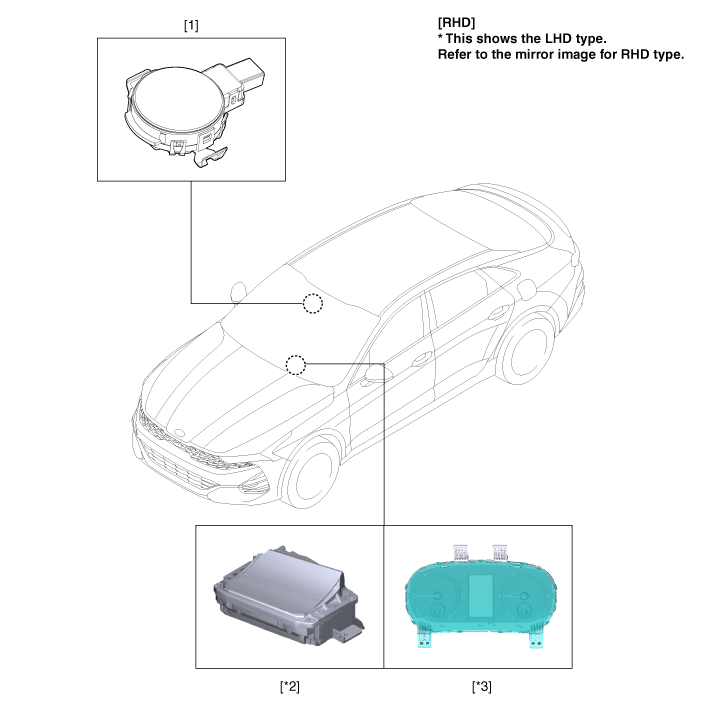
| 1. Rain Sensor 2. Head-Up Display (HUD) |
3. Instrument Cluster |
Description and Operation
Description
The HUD system displays various information on the windshield, minimizing the driver's eye movement for improved safety and convenience.
The head-up display projects TFT LCD images onto two mirrors (flat/concave) and displays them at a distance of 2.2 m from the driver's eyes.
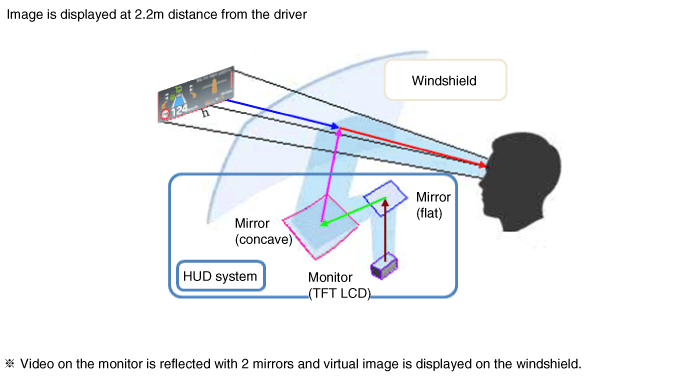
Information provided by HUD
Driving Information: Vehicle Speed
Turn-by-turn navigation information, road signs.
ADAS: SCC, LKA, BCW
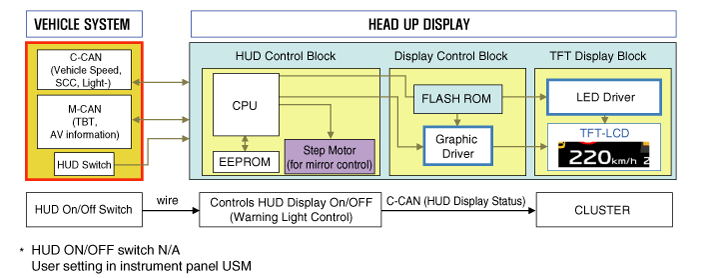
System Diagram
Component Description
Head-Up Display: an electronic system that improves safety and convenience by projecting vehicle information onto the windshield to minimize the driver's eye movement.

HUD ON/OFF: There is no ON/OFF switch for the head-up display. Turn it on or off in the user settings menu on the instrument cluster.
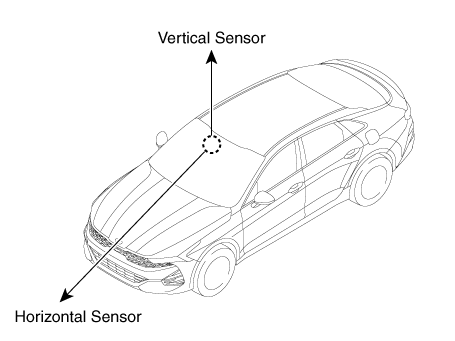
Light Sensor: equipped with a bidirectional (vertical and horizontal) sensor. HUD brightness is adjusted according to the horizontal measurement (ambient brightness).
Built-in bidirectional light sensor.
Windshield: the windshield is exclusive to the head-up display and has a built-in film to eliminate double images.
Test yourself
A quick Kia Optima DL3 quiz: every answer comes with an explanation and a link to the manual page.