Side Impact Sensor (SIS)
Description and Operation
Description
The Side Impact Sensor (SIS) system consists of two pressure-type side impact sensors, one (P-SIS) installed in each front door module center (left and right).
The pressure-type side impact sensor is also called P-SIS because it detects pressure caused by a collision at its installation location.
The side impact sensor is also called A-SIS because it detects acceleration.
The SRSCM determines airbag deployment and deployment timing through the SIS collision signal when a collision occurs.
Components and Component Location
Components
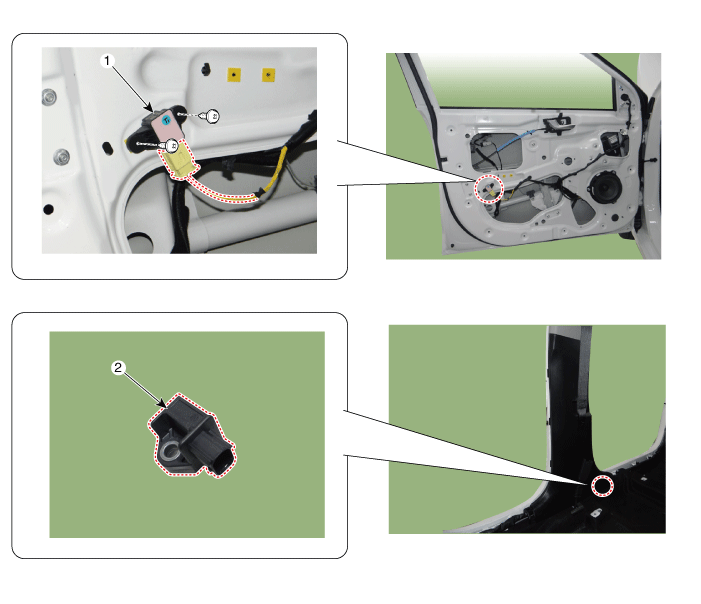
| 1. Pressure Side Impact Sensor (P-SIS) |
2. Front Gravity Side Impact Sensor (G-SIS) |
Repair Procedures
Removal
Pressure Side Impact Sensor (P-SIS)
Disconnect the negative battery cable and wait at least thirty seconds before starting work.
Remove the front door trim panel.
(Refer to Body - "Front Door Trim Panel")
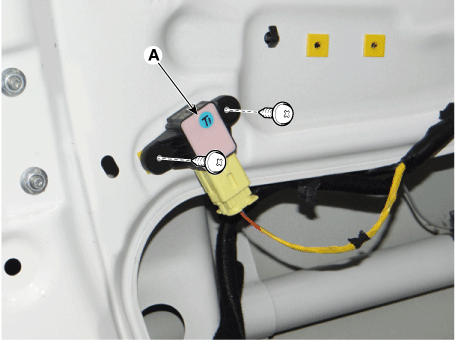
Remove the side pressure impact sensor (A).
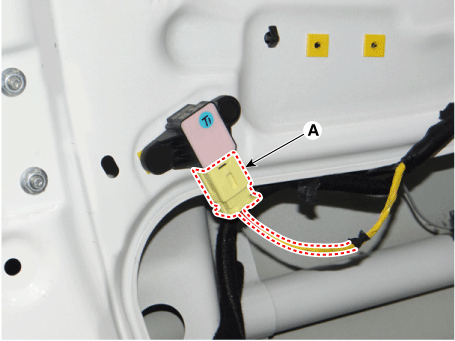
Loosen the side pressure impact sensor mounting screw and remove the sensor (A).
Front Gravity Side Impact Sensor (G-SIS)
Disconnect the negative battery cable and wait at least thirty seconds before starting work.
Remove the center pillar trim.
(Refer to Body - "Center Pillar Trim")
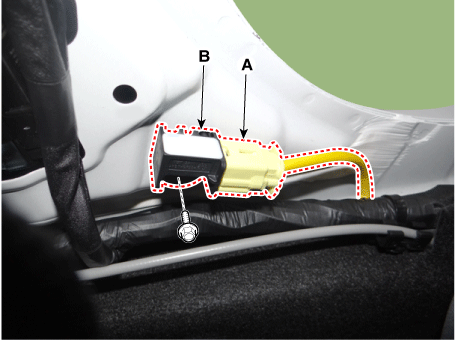
After disconnecting the side impact sensor connector (A) and loosening the bolt (B), remove the sensor.
Installation
Pressure Side Impact Sensor (P-SIS)
Disconnect the negative battery cable and wait at least thirty seconds before starting work.
Install the pressure side impact sensor screws.
Tightening torque: 3.0–4 N·m
Connect the pressure side impact sensor.
Install the front door trim panel.
(Refer to Body - "Front Door Trim Panel")
Connect the negative battery cable.
After installing the side impact sensor, check that the system operates properly.
• Turn the ignition switch ON. The SRS indicator should illuminate for approximately six seconds, and then turn off.
Front Gravity Side Impact Sensor (G-SIS)
Disconnect the negative battery cable and wait at least thirty seconds before starting work.
Connect the side impact sensor connector (A) and tighten the bolt (B).
Tightening torque: 3.0–4 N·m
Install the front door trim panel.
(Refer to Body - "Front Door Trim Panel")
Connect the negative battery cable.
After installing the side impact sensor, check that the system operates correctly:
• Turn the ignition switch ON. The SRS indicator should illuminate for approximately six seconds, and then turn off.
Test yourself
A quick Kia Rio YB quiz: every answer comes with an explanation and a link to the manual page.