LCD Messages
Driving Information Display
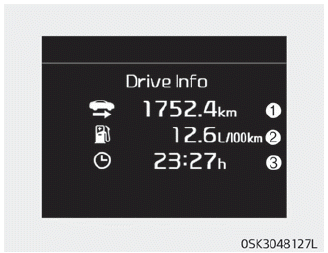
A driving information message is displayed at the end of each driving cycle.
This display shows the distance driven (1), average fuel economy (2) and driving time (3).
This information is displayed for several seconds when you turn the vehicle off, and then turns off automatically. The information is calculated each time the vehicle is turned on.
NOTICE
- If the cluster displays a sunroof open warning, the driving information message may not be displayed.
- To set the charging time and/or climate control time, refer to the separate navigation system manual for detailed information.
Door, Hood, or Trunk Open
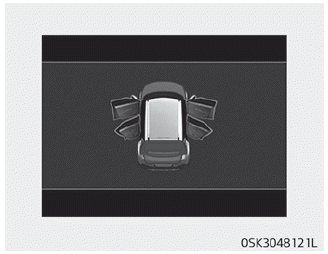
• This warning is displayed to indicate which door, hood or tailgate is open.
Sunroof Open
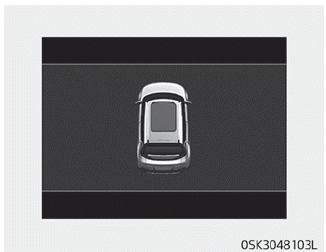
• This warning is displayed if you turn off the engine with a door open.
Light Mode
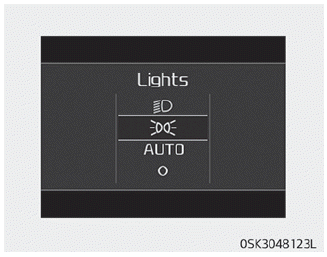
This indicator shows which exterior light is selected with the light control switch.
You can enable or disable the Wiper/Lights Display function in the User Settings mode on the instrument cluster LCD.
Wiper Mode
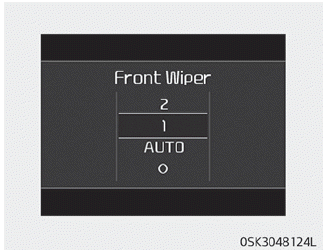
This indicator shows which wiper speed is selected with the wiper control switch.
You can enable or disable the Wiper/Lights Display function in the User Settings mode on the instrument cluster LCD.
Engine Overheated
• This warning message illuminates when the engine coolant temperature exceeds 120°C (248°F). This means the engine is overheating and may be damaged.
Low Battery (for Smart Key System)
• This warning message illuminates when the smart key battery is discharged when the engine start/stop button is in the OFF position.
Press the START button while turning the steering wheel (for smart key system).
• This warning message illuminates if the steering wheel does not unlock normally when the engine start/stop button is pressed.
• This means you must press the engine start/stop button while turning the steering wheel left and right.
Steering Wheel Unlocked (for Smart Key System)
• This warning message illuminates if the steering wheel is not locked when the Engine Start/Stop button is turned to the OFF position.
Check the Steering Wheel Lock System (for Smart Key System)
• This warning message illuminates if the steering wheel is not locked properly when the Engine Start/Stop button is turned to the OFF position.
Depress the clutch pedal to start the engine (for Smart Key System and Manual Transmission)
• This warning message illuminates if the engine start/stop button is changed to the ACC position by pressing the button twice without pressing the clutch pedal.
• This means you must depress the clutch pedal to start the engine.
Key Not In Vehicle (for Smart Key System)
• This warning message illuminates if the electronic key is not inside the vehicle when you press the engine start/stop button.
• This means you must always keep the smart key with you.
Key Not Detected (for Smart Key System)
• This warning message illuminates if the smart key is not detected when you press the engine start/stop button.
Shift to P or N to start the engine (for smart key system)
• This warning message illuminates if you attempt to start the engine with the shift lever not in P (Park) or N (Neutral).
Press the Brake Pedal to Start the Engine (for Smart Key System)
• This warning message illuminates if the engine start/stop button is changed to the ACC position by pressing the button twice without pressing the brake pedal.
• This means you must depress the brake pedal to start the engine.
Battery Discharge Due to External Electrical Devices (if equipped)
The vehicle may detect battery self-discharge caused by an overcurrent generated by unauthorized electrical devices, such as installing a black box while parked.
Note that functions such as ISG are limited and battery discharge problems may occur.
If the warning remains even after removing external electrical devices, have your vehicle checked at a professional workshop. Kia recommends visiting an authorized Kia dealer/service partner.
Press the START button again (for Smart Key System)
- This warning message illuminates if the engine START/STOP button cannot be operated. There is a problem with the engine START/STOP button system.
- This means you can start the engine by pressing the engine start/stop button again.
- If the warning illuminates every time you press the engine start/stop button, have your vehicle checked at a professional workshop. Kia recommends visiting an authorized Kia dealer/service partner.
Press the START button with the key (for smart key system)
- This warning message illuminates if you press the engine START/STOP button while the "Key Not Detected" warning message is displayed.
- At this time, the immobilizer indicator blinks.
Check the DAW system (if equipped)
This warning message is displayed if there is a problem with the Driver Attention Warning (DAW) system. In this case, have your vehicle checked at a professional workshop. Kia recommends visiting an authorized Kia dealer/service partner.
❈ For more details, refer to "Driver Attention Warning (DAW)" on page 6-125.
Check the BCW system (if equipped)
This warning message is displayed if there is a problem with the Blind-Spot Collision Warning (BCW) system. In this case, have your vehicle checked at a professional workshop. Kia recommends visiting an authorized Kia dealer/service partner.
❈ For more details, refer to "Blind-Spot Collision Warning (BCW)" on page 6-108.
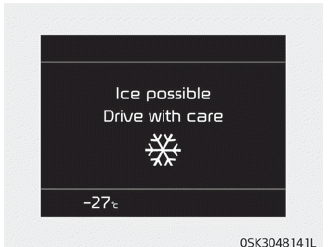
This warning alerts the driver that the road surface may be icy.
The warning light (including the outside air temperature sensor) illuminates when the following conditions occur. It flashes 5 times, then stays on, and a warning chime sounds once.
- The outside air temperature sensor reading is below approximately 4 °C (40°F).
NOTICE
If a slippery road warning appears while driving, drive more carefully and safely. Avoid exceeding the speed limit, rapid acceleration, sudden braking, sharp steering, etc.
Test yourself
A quick Kia Soul Owner's Manual quiz: every answer comes with an explanation and a link to the manual page.