USB Charger
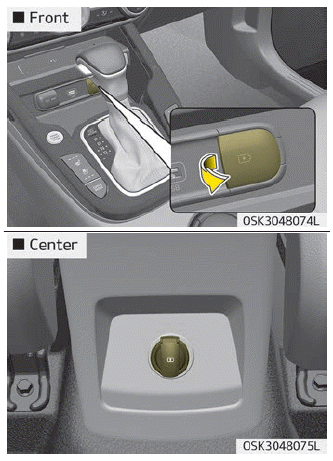
The USB charger allows drivers to charge digital devices such as smartphones and tablet PCs. Connect the cable to the USB port to start charging.
The vehicle USB charger is available in either the ACC or ignition ON mode. However, we recommend that you connect USB and digital devices with the engine running. Check the device display screen to confirm that charging is complete. Your smartphone or tablet PC may become warm during charging. This is not a cause for concern, as it does not affect the life or function of the device. For safety reasons, charging may stop if the battery becomes warm to a certain temperature, to prevent damage to the devices. Charging of some digital devices is not available or requires special adapters if their charging method does not match how the vehicle USB charger operates. Quick Charge 2.0 is available on smartphones or tablet PCs with quick charge capability. Applies as follows: (https://www.qualcomm.com/documents/quick-charge-device-list). A smartphone or tablet PC without quick charge capability charges at the normal rate.
Rated output:
Digital devices with quick charge: - 9.0 V, 1.67 A
Digital devices with normal charge: - 5.0 V, 2.1 A
CAUTION
- Use the vehicle USB charger with the ignition ON. Otherwise, the vehicle battery may be discharged.
- Use the official USB cable of the digital device manufacturer for charging.
- Make sure that no foreign objects, drinks, or water come into contact with the vehicle USB charger. Water or foreign objects may damage the USB charger.
- Do not use the device if the current consumption exceeds 2.1 A.
- Do not connect electrical devices that generate excessive electromagnetic noise to the vehicle USB port. Otherwise, noise may occur or the vehicle electronic devices may malfunction. Charging may be interrupted while audio or AV is on.
- If the charger is connected incorrectly, serious damage to devices may result. Damage caused by improper use is not covered by the warranty.
Test yourself
A quick Kia Soul Owner's Manual quiz: every answer comes with an explanation and a link to the manual page.