Wireless Smartphone Charging System
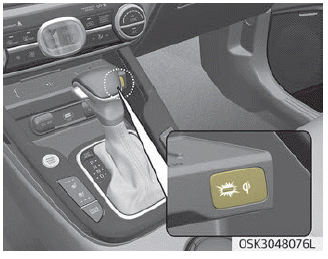
The wireless smartphone charging system is located in front of the center console.
Close all doors firmly and turn the ignition to ACC or IGN ON. To start wireless charging, place a smartphone equipped with wireless charging on the wireless charging pad.
For best wireless charging results, place the smartphone in the center of the charging pad.
The wireless charging system is designed for one smartphone equipped with Qi, for one use only. Please refer to the smartphone accessory cover or the phone manufacturer's website to check whether your smartphone supports the Qi function.
WARNING
If any metallic object, such as coins, is placed between the wireless charging system and the smartphone, charging may be interrupted. In addition, the metallic object may become hot.
Smartphone Wireless Charging
1. Remove all objects from the smartphone charging pad, including the smart key. If there is any foreign object other than the smartphone on the pad, the wireless charging function may not operate properly.
2. Place the smartphone in the center of the wireless charging pad.
3. The indicator light will change to orange when wireless charging starts. After charging is complete, the orange light will change to green.
4. You can turn the wireless charging function on or off by selecting USM on the instrument cluster. (Refer to "Instrument Panel" on page 4-45 for details.)
If wireless charging does not work, carefully move the smartphone around on the pad until the charging indicator turns yellow. Depending on the smartphone, the charging indicator may not turn green even after charging is complete.
If wireless charging does not work properly, the orange indicator will flash and continue flashing for ten seconds, then turn off. In such cases, remove the smartphone from the pad and place it on the pad again, or check the charging status.
If the smartphone is left on the charging pad when the ignition is switched off and the vehicle is in the OFF position, the vehicle will warn you with warning messages and a sound (applicable to vehicles with voice control function) after the "Goodbye" function on the instrument panel ends.
NOTICE
For some cell phone manufacturers, the system may not warn even though the cell phone remains on the wireless charger. This is due to the characteristics of the cell phone, not a malfunction of the wireless charging system.
CAUTION
- When the internal temperature of the wireless charging system rises above the set temperature, wireless charging will stop. After the temperature inside the vehicle drops below the threshold, the wireless charging function will resume.
- If a foreign object is between the smartphone and the wireless charging pad, remove the smartphone immediately. Remove the metallic object after it has completely cooled.
- Wireless charging may not operate properly if the smartphone has a thick accessory cover.
- Wireless charging will stop when the Smart Key wireless search function is in use, to prevent radio wave interference.
- Wireless charging will stop when the smart key is moved out of the vehicle with the ignition on.
- Wireless charging will stop when any door is opened (applicable to vehicles equipped with a smart key).
- Wireless charging will stop when the vehicle is turned off.
- Wireless charging will stop when the smartphone is not in full contact with the wireless charging pad.
- Items equipped with magnetic components, such as credit cards, telephone cards, bank books, transportation tickets, etc., may be damaged during wireless charging.
- For best results, place the smartphone in the center of the charging pad. The smartphone may not charge if placed near the edge of the charging pad. When the smartphone is charging, it may overheat.
- Smartphones without a built-in wireless charging system must be equipped with an accessory.
- Smartphones from some manufacturers may display low current messages. This is due to the specific characteristics of the smartphone and does not indicate a malfunction of the wireless charging function.
- The indicator light on some manufacturers' smartphones may remain yellow after the smartphone is fully charged. This is due to the specific characteristics of the smartphone, not a malfunction of the wireless charging system.
- When any smartphone without wireless charging function or any object with a metallic case is placed on the charging pad, a slight sound may be heard. This slight sound occurs because the vehicle recognizes the compatibility of the object placed on the charging pad. It does not affect your vehicle or smartphone.
- The wireless charging system may not support certain cellular phones that have not passed Qi specification compliance testing ( ).
- For some cell phones with their own protection function, the wireless charging speed may decrease or wireless charging may stop.
Test yourself
A quick Kia Soul Owner's Manual quiz: every answer comes with an explanation and a link to the manual page.