Audio System Button Operation
Without Bluetooth Hands-Free

With Bluetooth Hands-Free

Volume Adjustment
To increase the volume, press the volume control switch up (+).
To decrease the volume, press the volume control switch down (-).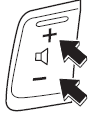
Seek Buttons
AM/FM Radio (Type A/Type C/Type D), MW/LW/FM Radio (Type B)
Press the seek switch (
or
). The radio switches to the next or previous preset station in the order in which they were stored.
Press and hold the seek switch ( or
 ) to
find all available stations at a lower or higher frequency, whether or not they were previously stored.
Radio stations preset by auto-tuning (Type A/Type B) or added to favorites (Type C/Type D) can be recalled during auto-tuning (Type A/Type B) or adding to favorites (Type C/Type D) by pressing the seek button ( ,
). The stored stations are recalled in the order in which they were stored, each time you press the switch (or ).
DAB Radio (Type D)
While listening to DAB radio, press the seek button (, ), to
recall a station previously added to the Favorites list. Each press recalls the stations in the order they were added to the list.
Press and hold the seek button (), to go
to the next station, () to return
to the previous station.
USB Audio/Bluetooth Audio/CD
Press the seek switch (),
to go to the beginning of the next track.
Press the seek switch (
) a few seconds after playback has started, to go to the beginning of the previous track.
Press the seek switch ()
after a few seconds of playback, to start playing the current track from the beginning.
To continue searching through tracks, press and hold the switch (or ).
DVD (Type C)
Press the seek switch (
), to go to the beginning of the next chapter.
Press the seek switch (),
to return to the beginning of the previous chapter.
Aha/Stitcher Radio (Type C/Type D)
Press the seek switch (
), to go to the beginning of the next track.
Press and hold the seek button (), to rate
the current track as "Like."
Press and hold the seek button (), to rate
the current track as "Dislike."
Mute Button*
Press the button ( ) to
mute the audio. Press it again to return to the previous settings.
CAUTION
When the ignition is switched off, the MUTE function is cancelled. Therefore, after restarting the engine, the sound will not be muted. To mute the sound again, press the button ( ).
Test yourself
A quick Mazda 2 quiz: every answer comes with an explanation and a link to the manual page.