Mazda Radar Cruise Control (MRCC)
The Mazda Radar Cruise Control (MRCC) system is designed to maintain a set following distance based on vehicle speed, using a radar sensor that detects the distance to the vehicle ahead. By presetting the vehicle speed between 30 km/h and 145 km/h, the driver is free to not use the accelerator or brake pedals.
In addition, if your vehicle approaches the vehicle ahead too closely, for example because the vehicle ahead brakes suddenly, an audible alarm and a warning indication on the display are activated at the same time to alert you to maintain a sufficient distance between vehicles.
Use the Mazda Radar Cruise Control (MRCC) system on expressways and other highways, where there is little need for repeated acceleration and deceleration.
WARNING
Do not rely entirely on the Mazda Radar Cruise Control (MRCC) system and always drive carefully:
The Mazda Radar Cruise Control (MRCC) system is designed to reduce driver fatigue by maintaining a constant vehicle speed or, more precisely, a constant distance between your vehicle and the detected vehicle ahead based on that vehicle's speed. The system has detection limitations depending on the type and condition of the vehicle ahead, weather conditions and road conditions. In addition, the system may not be able to decelerate enough to avoid colliding with the vehicle ahead if it brakes suddenly, or if another vehicle forces you to change lanes, which could result in an accident. Always check the safety of the surrounding area and depress the brake or accelerator pedal while maintaining a sufficient distance from vehicles ahead of or behind you.
Do not use the Mazda Radar Cruise Control (MRCC) system in the following locations. Otherwise, an accident could result:
- On roads with sharp curves, on roads with heavy traffic and where there is not enough space between vehicles. On roads where repeated acceleration and deceleration occur frequently (driving under these conditions with the Mazda Radar Cruise Control (MRCC) system is not possible).
- When entering or exiting interchanges, service areas and parking areas on expressways (if you exit an expressway while distance control is active, the vehicle ahead is no longer tracked and your vehicle may accelerate to the set speed).
- Slippery roads such as icy or heavily snow-covered roads (the tires could slip and cause you to lose control of the vehicle).
- On long downhill grades (to maintain the distance between vehicles, the system automatically and continuously applies the brakes, which could result in brake fade).
For safety reasons, turn off the Mazda Radar Cruise Control (MRCC) system when it is not in use.
WARNING
If the vehicle is being towed or you are towing something, turn off the Mazda Radar Cruise Control (MRCC) system to prevent a malfunction.
NOTE
The Mazda Radar Cruise Control (MRCC) system operates when all of the conditions listed below are met.
- The vehicle speed is approximately 30 km/h to 145 km/h.
- The Mazda Radar Cruise Control (MRCC) system is turned on.
- The parking brake is not applied.
- The Dynamic Stability Control (DSC) system is operating normally. (Manual transmission)
- The shift lever is in a position other than reverse (R) or neutral (N).
- The clutch pedal is not depressed. (Automatic transmission)
- The shift lever is in Drive (D) or manual mode (M).
In the cases described below, the warnings may not activate even if your vehicle approaches the vehicle ahead.
- You are driving at the same speed as the vehicle ahead.
- Immediately after setting the Mazda Radar Cruise Control (MRCC) system.
- When the accelerator pedal is depressed, or immediately after releasing the accelerator pedal.
- When another vehicle forces you to move back into your lane.
The following are not detected as physical objects.
- Oncoming vehicles
- Pedestrians
- Stationary objects (stopped vehicles, obstacles)
If a vehicle ahead is travelling very slowly, the system may not detect it correctly.
When driving with distance control, do not set the system to follow two-wheeled vehicles such as motorcycles or bicycles.
Do not use the Mazda Radar Cruise Control (MRCC) system in conditions where proximity warnings activate frequently.
When driving with distance control, the system accelerates and decelerates your vehicle according to the speed of the vehicle ahead. However, if acceleration is needed to change lanes, or if the vehicle ahead brakes suddenly and you must close the distance quickly, accelerate using the accelerator pedal or decelerate using the brake pedal, as appropriate.
When the Mazda Radar Cruise Control (MRCC) system is active, it does not cancel even if the selector lever (automatic transmission) or shift lever (manual transmission) is operated, and no intentional engine braking will occur. If deceleration is required, reduce the set vehicle speed or depress the brake pedal.
Mazda Radar Cruise Control (MRCC) Display Indication
The status of the Mazda Radar Cruise Control (MRCC) system is shown on the instrument panel display.
A malfunction in the system or operating conditions is indicated by a warning.
Refer to Indicator and Warning Lights on page 4-24.
Refer to Mazda Radar Cruise Control (MRCC) Warnings on page 7-43.
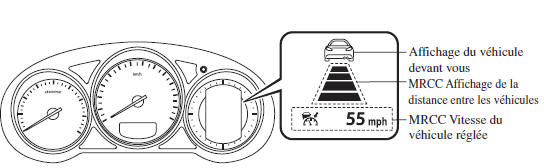
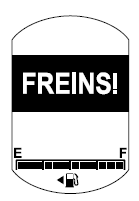
Proximity Warning
If your vehicle rapidly approaches the vehicle ahead because that vehicle braked suddenly while you were driving with distance control, the warning buzzer will sound and the braking warning will be displayed.
Always check the safety of the surrounding area, and depress the brake pedal while maintaining a safe distance from the vehicle ahead.
In addition, always keep a safe distance from vehicles ahead.
System Settings

When the ON switch is pressed, the vehicle speed and the distance between vehicles can be set while distance control is active. The Mazda Radar Cruise Control (MRCC) indication is shown on the instrument panel display.
NOTE
If the switch is in ACC or OFF while the Mazda Radar Cruise Control (MRCC) is on, the MRCC is automatically turned off.
How to Set the Vehicle Speed
- Adjust the vehicle speed to the desired setting using the accelerator pedal.
- Distance control starts when the SET + or SET - switch is pressed. The set speed and the inter-vehicle distance display are indicated by white lines. The Mazda Radar Cruise Control (MRCC) indicator (green) is displayed at the same time.
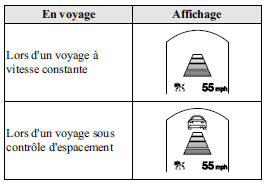
NOTE
- If a vehicle ahead is detected while you are driving at a constant speed, the vehicle-ahead indication is displayed and distance control is performed. Also, when the vehicle ahead is no longer detected, the vehicle-ahead indication turns off and the system returns to constant-speed cruising.
- If you are driving the vehicle faster than the set speed, distance control with the vehicle ahead is not possible. Set the system to the desired vehicle speed using the accelerator pedal.
How to Adjust the Distance Between Vehicles While Distance Control Is Active
Each time the switch is pressed, the distance between vehicles is set to a shorter distance. Pressing the switch sets the distance between vehicles to a longer distance. The distance between vehicles can be set to 4 levels: long, medium, short and extra short.
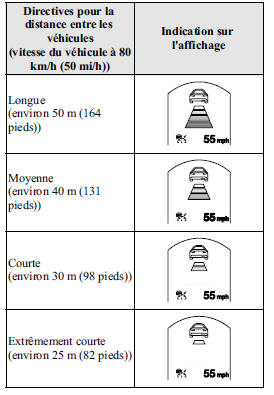
NOTE
- The distance between vehicles varies depending on vehicle speed; the lower the vehicle speed, the shorter the distance.
- If the switch is in ACC or OFF and the engine is then restarted, the system automatically sets the distance between vehicles to the previous setting.
Changing the Set Vehicle Speed
Changing the Set Vehicle Speed Using the SET Switch
Press the SET + switch to accelerate.
Press the SET - switch to decelerate.
The set vehicle speed changes as follows each time the SET switch is pressed.
 NOTE
For example, the set vehicle speed changes when the SET switch is pressed four times as follows: The vehicle accelerates or decelerates by approximately 4 km/h.
To Accelerate Using the Accelerator Pedal
Depress the accelerator pedal, then press and release the SET+ or SET- switch at the desired speed. If a switch cannot be operated, the system returns to the set speed when you release the accelerator pedal.
WARNING
Warnings and brake control do not operate while the accelerator pedal is depressed.
NOTE
- When accelerating with the SET+ switch while the distance control is active, you can adjust the vehicle speed, but acceleration is not possible. If there is no longer a vehicle ahead, acceleration continues until the vehicle reaches the set speed. Check the set vehicle speed by viewing the vehicle speed display on the instrument panel.
- When you depress the accelerator pedal, the inter-vehicle distance display on the instrument panel changes to the white line display.
- The minimum speed that can be set is 30 km/h. If the set vehicle speed reaches 30 km/h using the switch, a constant cruising speed of approximately 30 km/h is maintained even if the SET- switch is pressed. The Mazda Radar Cruise Control (MRCC) system is not canceled.
To cancel
The Mazda Radar Cruise Control (MRCC) is canceled when the OFF switch is pressed.
When the system is temporarily canceled
In the cases listed below, the Mazda Radar Cruise Control (MRCC) system is temporarily canceled and the message "MRCC System Canceled" appears on the instrument panel display. The Mazda Radar Cruise Control (MRCC) indicator light (green) turns off at the same time.
- The CANCEL switch is pressed.
- The brake pedal is depressed.
- The parking brake is engaged.
- The selector lever is moved to park (P), neutral (N), or reverse (R) (automatic transmission).
- The shift lever is in reverse (R) (manual transmission).
- In the cases listed below, the message "MRCC System Canceled" appears and the buzzer sounds once.
- The vehicle speed decreases to less than 25 km/h (16 mph).
- DSC has operated.
- TCS has operated for a period of time.
- Smart City Brake Support (SCBS) has operated.
- When driving down a long downhill grade.
- There is a problem with the system. (Manual transmission)
- The shift lever has remained in neutral (N) for a period of time.
- The clutch pedal has remained depressed for a period of time.
- The engine stalls.
NOTE
- The Mazda Radar Cruise Control (MRCC) system may be canceled in rain, fog, snow, or other bad weather, or if the front surface of the grille is dirty.
- If the Mazda Radar Cruise Control (MRCC) system has been temporarily canceled, you can return to the previously set speed by pressing the RES switch once the following conditions are met.
- All Mazda Radar Cruise Control (MRCC) operating conditions have been met.
- A certain amount of time has passed since the system was automatically canceled while driving down a long downhill grade.
- If the SET or RES switch is pressed before a certain amount of time has passed since the system was automatically canceled while driving down a long downhill grade, "MRCC Not Available" appears on the display.
- If the OFF switch is pressed to cancel the Mazda Radar Cruise Control (MRCC), the system cannot return to the previously set speed even if the RES switch is pressed.
Upshift/downshift request indicator (manual transmission)
The upshift/downshift request indicator may appear on the instrument panel display while the Mazda Radar Cruise Control (MRCC) system is operating. When this occurs, shift to the correct gear.
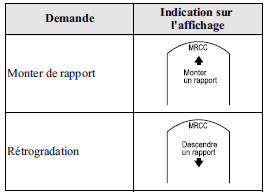 NOTE
- If you do not upshift when the upshift request indicator is displayed, the engine will be under load, and the Mazda Radar Cruise Control (MRCC) system may be automatically canceled or the engine may be damaged.
- If you do not downshift when the downshift request indicator is displayed, the Mazda Radar Cruise Control (MRCC) system may be automatically canceled or the engine may stall.
Handling the radar sensor
The Mazda Radar Cruise Control (MRCC) radar sensor is installed behind the grille.
Refer to Radar Sensor on page 4-85.
Test yourself
A quick Mazda 6 quiz: every answer comes with an explanation and a link to the manual page.