Cruise control system
The cruise control system allows you to set and automatically maintain the vehicle speed at any speed above 25 km/h.
WARNING
Do not use the cruise control system in the following conditions. Using the cruise control system in the following conditions is dangerous and may cause loss of vehicle control.
- Hilly terrain
- Steep grades
- Heavy or variable traffic
- Slippery or winding roads
- Any similar condition that requires speed variations
Cruise control switch
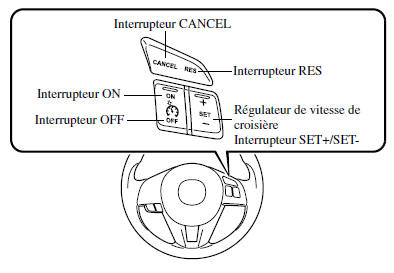
Turning the system on/off
To turn the system on, press the ON switch.
The cruise control main indicator light (amber) comes on.
Refer to Indicator and Warning Lights on page 4-24.
To turn the system off, press the OFF switch.
The cruise control main indicator light (amber) goes off.
WARNING
Always turn off the cruise control system when it is not in use:
Leaving the cruise control system on when it is not in use is dangerous: the system could engage unexpectedly if the set button is pressed accidentally, which may cause loss of vehicle control and an accident.
To set the speed
- Turn on the cruise control system by pressing the ON switch.
The cruise control main indicator light (amber) comes on.
Refer to Indicator and Warning Lights on page 4-24.
- Accelerate to the desired speed, which must be higher than 25 km/h.
- Set the cruise control by pressing the SET + or SET - switch at the desired speed.
The cruise control speed is set at the moment the SET + or SET - switch is pressed.
Release the accelerator pedal at the same time. The cruise control set indicator (green) turns on.
NOTE
- Release the SET + or SET - switch at the desired speed; otherwise the speed will keep increasing while the SET + switch is held, and keep decreasing while the SET - switch is held (except when the accelerator pedal is depressed).
- On a slope, the vehicle speed may decrease when climbing or increase when descending.
- The cruise control will no longer operate if the vehicle speed drops below 21 km/h while it is engaged, for example when climbing a fairly steep hill.
- The cruise control may cancel if the speed drops more than 15 km/h below the set speed (for example when climbing a long, steep hill).
For a type A meter, the speed preset using the cruise control is shown on the instrument panel.
 To increase
the cruise speed
Use one of the following methods.
To increase speed using the cruise control switch
Press and hold the SET + switch. The vehicle will accelerate.
Release the switch at the desired speed.
Press SET + and release immediately to adjust the set speed. Multiple operations will increase the set speed according to the number of operations.
Speed increase with a single SET + operation: Meter display for vehicle speed in km/h: 1 km/h Meter display for vehicle speed in mph: 1 mph (1.6 km/h)
To increase speed using the accelerator pedal
Press the accelerator pedal to accelerate to the desired speed.
Press the SET + or SET - switch and release it immediately.
NOTE
Accelerate normally if a higher speed is temporarily needed while the cruise control is engaged. A higher speed does not interfere with or change the set speed.
Release the accelerator pedal to return to the set speed.
To decrease the cruise speed
Press and hold the SET - switch. The vehicle will decelerate gradually.
Release the switch at the desired speed.
Press the SET - switch and release it immediately to adjust the set speed. Multiple operations will decrease the set speed according to the number of operations.
Speed decrease with a single SET - operation - Meter display for vehicle speed in km/h: 1 km/h Meter display for vehicle speed in mph: 1 mph (1.6 km/h)
To resume the cruise speed above 25 km/h
If the cruise control function has been cancelled without using the OFF switch (for example by depressing the brake pedal) and the system is still active, it is possible to return to the last set speed by pressing the RES switch.
If the vehicle speed is below 25 km/h, accelerate to 25 km/h or more and press the RES switch.
To cancel temporarily
To cancel the system temporarily, use one of these methods:
- Lightly depress the brake pedal.
- Depress the clutch pedal (manual transmission only).
- Press the CANCEL switch.
If the RESUME switch is pressed when the vehicle speed is 25 km/h or more, the system returns to the previously set speed.
To cancel
To turn the system off, press the OFF switch.
Test yourself
A quick Mazda 6 quiz: every answer comes with an explanation and a link to the manual page.