Radar Sensor
Your vehicle is equipped with a radar sensor.
The systems listed below also use the radar sensor.
- Mazda Radar Cruise Control (MRCC)
- Forward Obstruction Warning (FOW)
The radar sensor detects radio waves reflected from a vehicle ahead of you or from an obstacle, and transmits them through the radar sensor.
The radar sensor is mounted behind the emblem on the front.
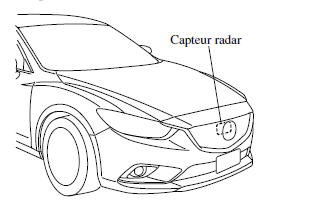
If "Radar blocked" is displayed in the multi-information display, clean the area around the radar sensor.
WARNING
- Observe the following warnings to ensure correct operation of each system.
- Do not place stickers (even transparent ones) on the grille, the front emblem, or around the radar sensor, and do not replace the grille or front emblem with a product that is not genuine and not designed for use with the radar sensor.
- The radar sensor has a function that detects contamination on the front surface of the radar sensor and informs the driver. However, depending on conditions, it may take time to detect, or may not detect at all, plastic shopping bags, ice, or snow. If this occurs, the system may not operate correctly, so the radar sensor must always be kept clean.
- Do not install a grille guard.
- If the front of the vehicle has been damaged in a traffic accident, the position of the radar sensor may have changed. Stop using the system immediately and always have the vehicle inspected by an authorized Mazda dealer.
- Do not use the front bumper to push other vehicles or obstacles, such as when getting out of a parking space. Otherwise the radar sensor could be struck and knocked out of position.
- Do not remove, disassemble, or modify the radar sensor.
- For repairs, replacement, or painting work around the radar sensor, consult an authorized Mazda dealer.
- Do not modify the suspension. If the suspension is modified, the vehicle's position may change and the radar sensor may not be able to correctly detect a vehicle or obstacle ahead of you.
NOTE
The radar sensor detects radio waves reflected from a vehicle ahead of you or from an obstacle, and transmits them through the radar sensor.
- The rear surface of the vehicle ahead does not reflect radio waves effectively, such as an empty trailer, a vehicle with a cargo bed covered by a soft top, vehicles with a hard plastic tailgate, and vehicles with rounded shapes.
- Vehicles ahead of you that are low in height, and therefore have less surface area to reflect radio waves.
- Visibility is reduced because the tires of a vehicle ahead throw water, snow, or sand onto your windshield.
- The cargo area/luggage compartment is loaded with heavy objects, or the rear passenger seats are occupied.
- There is ice, snow, or dirt on the front surface or on the front emblem.
- In bad weather, such as rain, snow, or sandstorms.
- When driving near facilities or objects that emit strong radio waves.
In the cases listed below, the radar sensor may detect vehicles in the oncoming lane or surrounding obstacles, or it may not be able to detect vehicles or obstacles ahead of you.
- At the beginning and end of a curve.
- On winding, switchback roads.
- Roads with reduced lanes due to road works or lane closures.
- The vehicle ahead enters the blind spot of the radar sensor.
- The vehicle ahead is traveling at an abnormal speed due to an accident or because it is damaged.
- Continuously hilly roads
- Driving on roads in poor condition or on unpaved roads.
- The distance between your vehicle and the vehicle ahead is extremely short.
- A vehicle suddenly moves in very close, as if to cut in front of you.
To prevent incorrect system operation, use tires of the same size, manufacturer, brand and tread pattern on all four wheels. Also, do not use tires with noticeably different wear patterns or tire pressures on the same vehicle. (Including the temporary spare tire)
If the battery is weak, the system may not operate correctly.
When driving on roads with little traffic and few vehicles ahead or obstacles for the radar sensor to detect, "Radar blocked" may be displayed temporarily. However, this does not indicate a problem.
Test yourself
A quick Mazda 6 quiz: every answer comes with an explanation and a link to the manual page.