Lane Departure Warning System (LDWS)
Lane Departure Warning System (LDWS) (Canada only)
- The LDWS informs the driver that the vehicle is at risk of drifting out of its lane.
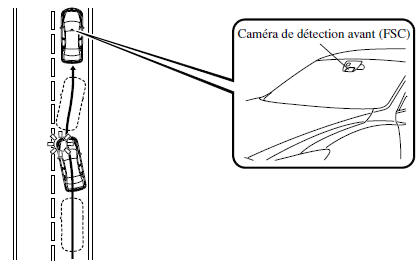
- The system detects white (yellow) lane lines on the driving lane using the forward sensing camera (FSC) and, when it determines that the vehicle is at risk of leaving its lane, it informs the driver by illuminating the LDWS indicator (green) and sounding the LDWS audible alarm.
- Use the LDWS when driving the vehicle on roads with white (yellow) lane lines.
- For vehicles equipped with a Type A instrument panel, check the vehicle condition or have the vehicle inspected by an authorized Mazda dealer as indicated.
- A malfunction in the system or operating conditions is indicated by a warning.
Refer to Indicator and Warning Lights on page 4-24.
Refer to the Lane Departure Warning System (LDWS) Audible Alarm section on page 7-42.
WARNING
Do not use the LDWS under the following conditions.
The system may not operate correctly depending on actual driving conditions, which may result in an accident.
- Driving on roads with sharp curves.
- Driving in bad weather (rain, fog and snow).
The LDWS functions are limited.
Always follow the lane using the steering wheel and drive carefully.
The system is not designed to compensate for a driver's lack of attention, and over-reliance on the LDWS may result in an accident.
WARNING
- Do not modify the suspension. If the vehicle height or the damping force of the suspension is changed, the LDWS may not operate properly.
- Do not remove the forward sensing camera (FSC). Otherwise, the system may not operate normally.
- Observe the following precautions to ensure the LDWS operates correctly.
- Do not place reflective objects on the instrument panel.
- Keep the windshield glass near the Forward Sensing Camera (FSC) clean.
- Do not attach accessories, stickers, or films to the windshield near the Forward Sensing Camera (FSC). If any object is in front of the camera lens, even a clear sticker, it will block the lens and the system will not operate correctly.
- Consult a Mazda authorized dealer before performing any repairs around the rear view mirror.
- Always keep the windshield glass around the Forward Sensing Camera (FSC) clean. If the windshield fogs up, defog it using the front defroster.
- When cleaning the windshield, do not let window cleaner or similar washer fluids run onto the Forward Sensing Camera (FSC) lens. Also, do not touch the Forward Sensing Camera (FSC) lens.
- Consult a Mazda authorized dealer to clean the inside surface of the windshield around the Forward Sensing Camera (FSC).
NOTE
- If your vehicle leaves its driving lane, the LDWS operates (audible alarm and indicator). Steer the vehicle correctly to guide it to the center of the lane.
- When the turn signal lever is operated to change lanes, the LDWS alert is automatically canceled. The LDWS indicator illuminates when the turn signal lever returns to its original position and the system detects white (yellow) lane lines.
- If the steering wheel, accelerator pedal or brake pedal is operated suddenly and the vehicle approaches a white (yellow) line, the system determines that the driver is changing lanes and the LDWS warning is automatically cancelled.
- The LDWS may not operate for a short period immediately after the vehicle deviates from its lane, or if the vehicle repeatedly leaves its lane within a short time.
- The LDWS does not operate if it does not detect the white (yellow) lane lines.
- Under the following conditions, the LDWS may not correctly detect white (yellow) lines and may not operate properly.
- An object placed on the instrument panel is reflected on the windshield and detected by the camera.
- Heavy luggage is loaded in the luggage compartment or on the rear seat and the vehicle is tilted.
- Tire pressure is not adjusted to the specified pressure.
- Driving on the entrance or exit ramp of a rest area or toll plaza on a motorway.
- White (yellow) lines are less visible due to dirt or peeling paint.
- The vehicle ahead of your vehicle is driving near a white (yellow) line and the line is less visible.
- A white (yellow) line is less visible due to bad weather (rain, fog or snow).
- Driving on a temporary lane or section where a lane is closed due to road works
- A misleading line on the road is taken for a temporary line from road works, a shadow, snow or water-filled grooves.
- Ambient brightness changes suddenly, such as when entering or exiting a tunnel.
- Headlight illumination is weakened by dirt, or the headlight aim is misaligned.
- The windshield is dirty or fogged.
- Rear lights are reflected on the road surface.
- The road surface is wet and shiny after rain, or there are puddles on the road.
- The shadow of a guardrail parallel to a white (yellow) line falls on the road.
- The lane width is excessively narrow or wide.
- The road is too rough.
- The vehicle is jolted after running over a bump in the road.
- There are two or more adjacent white (yellow) lines.
- There are various road or lane markings of different shapes near an intersection.
When the system is operating
- Press the LDWS switch. The LDWS goes into standby mode and the LDWS indicator (amber) comes on.
On the Type A instrument panel, the lane indication (edge line) is shown on the display.
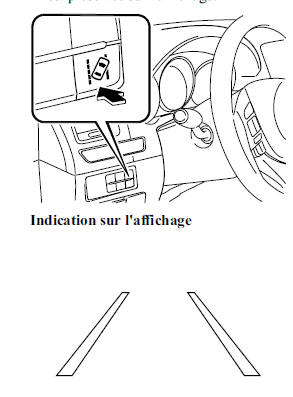
- Drive the vehicle near the center of the lane. The LDWS indicator (green) on the instrument panel comes on when all of the following conditions are met.
On the Type A instrument panel, the lane indication is shown on the display.
- The vehicle is driving near the center of the lane with white (yellow) lines on the left and right sides, or on one side or the other.
- Vehicle speed is approximately 65 km/h or more
- The vehicle is driving on a straight road or a road with gentle curves
Display indication

NOTE
- The LDWS remains in standby until it detects white (yellow) lines on both the left and right, or on one side or the other.
- When the system detects a white (yellow) line on one side only, it activates the warning only when the vehicle leaves the lane on the side of the detected white (yellow) line.
Automatic cancellation
Under the following conditions, the LDWS is automatically cancelled and remains in standby, and the LDWS indicator (amber) on the instrument panel comes on.
On the Type A instrument panel, the lane indication (edge line) is shown on the display.
The LDWS automatically resumes when the condition changes and the system is operable.
- The system cannot detect white (yellow) lines.
- Vehicle speed is less than approximately 60 km/h.
- The vehicle enters a sharp curve.
- The vehicle enters a curve at an inappropriate speed
- The camera temperature is high or low.
- The windshield around the camera is fogged.
- The windshield around the camera is obstructed by an obstacle, resulting in poor forward visibility.
Automatic cancellation of the warning
Under the following conditions, the LDWS determines that the driver is changing lanes and the warning is automatically cancelled.
The LDWS automatically resumes after the operation.
- The steering wheel is operated suddenly.
- The brake pedal is depressed suddenly.
- The accelerator pedal is depressed suddenly.
- A turn signal lever is operated (once the turn signal lever has returned to its original position, the LDWS warning may not operate for approximately 3 seconds while the vehicle's position in the lane is corrected).
NOTE
- After approximately 5 seconds with the turn signal lever operated, the LDWS warning may activate if the vehicle is close to a white (yellow) line.
- The warning sensitivity (the sensitivity with which the system determines an intentional lane change by the driver) can be changed.
Refer to Customization Functions on page 9-9.
System cancellation
To cancel the LDWS, press the LDWS switch. The LDWS indicator (green/amber) on the instrument panel goes off.
The displayed lane indication goes off on the Type A instrument panel.
LDWS Warning
While operating, if the system determines that the vehicle may leave its lane, the LDWS audible warning sounds and the LDWS indicator (green) flashes.
Refer to Indicator and Warning Lights on page 4-24.
Refer to the Lane Departure Warning System (LDWS) Audible Alarm section on page 7-42.
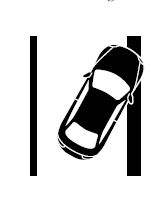
On the Type A instrument panel display, the direction in which the system has determined the vehicle may leave its lane is shown.
Steer the steering wheel appropriately and drive back to the center of the lane.
Display indication
 NOTE
- If the LDWS audible alert is set to sound, the sound will come from the speaker on the side of the vehicle toward which the system has determined the vehicle may be drifting out of its lane.
- The LDWS audible alert may not be heard depending on surrounding conditions, such as external noise.
- The timing of the alert, at which the system determines that the vehicle may leave its lane, can be changed.
Forward Sensing Camera (FSC)
- The LDWS camera, located near the inside rearview mirror, also functions as the Forward Sensing Camera (FSC) for the High Beam Control (HBC) system.
- If the temperature inside the Forward Sensing Camera (FSC) becomes very high or very low, the LDWS automatically cancels and enters standby mode, and the LDWS indicator light (amber) on the instrument panel flashes. A message is shown on the Type A instrument panel display.
The LDWS automatically activates when conditions change and the system becomes operable.

WARNING
Observe the following precautions to ensure correct operation of the Forward Sensing Camera (FSC).
- Do not remove the front sensing camera (FSC) cover.
- Consult an authorized Mazda dealer to clean the camera lens.
- Do not strike or apply considerable force to the Forward Sensing Camera (FSC) or the surrounding area. If the Forward Sensing Camera (FSC) has been subjected to a severe impact, do not use the LDWS and consult an authorized Mazda dealer.
- Consult an authorized Mazda dealer before performing repairs around the front sensing camera (FSC).
- The Forward Sensing Camera (FSC) aim has been precisely adjusted. Do not change the installation position of the Forward Sensing Camera (FSC) or remove it. Otherwise, damage or malfunction may result.
- Take care not to scratch the lens of the Forward Sensing Camera (FSC) and keep it clean. Also, do not disassemble the camera. Otherwise, damage or malfunction may result.
- Always keep the windshield glass around the camera clean by removing dirt or fog. Use the windshield defroster to remove fog.
Test yourself
A quick Mazda 6 quiz: every answer comes with an explanation and a link to the manual page.