Door locks
WARNING
Always take children or pets with you, or leave a responsible person with them:
Leaving a child or animal unattended in a parked vehicle is dangerous. In hot weather, the temperature inside a vehicle can rise to a level that may cause brain damage or even death.
Do not leave the key in the vehicle if children are present. Keep keys in a place where children cannot find them and cannot play with them:
Leaving children in the vehicle with the key is dangerous.
This could result in injury or death.
Keep all doors locked while driving:
Unlocked doors in a moving vehicle are dangerous. Passengers may fall out if a door is opened inadvertently, and they may be easily thrown out in an accident.
Always close all windows and the sunroof, lock the doors and take the key with you when leaving your vehicle unattended:
Leaving your vehicle unlocked is dangerous. Children may lock themselves in a hot vehicle, which may result in death. An unlocked vehicle is also an easy target for thieves and intruders.
After closing the doors, always check that they are securely closed:
Doors that are not securely closed are dangerous; if the vehicle is driven with a door not securely closed, the door could open unexpectedly and cause an accident.
Always confirm that it is safe before opening a door:
Opening a door suddenly is dangerous. Another vehicle or a pedestrian could be struck, causing an accident.
NOTE
- The vehicle accidental lock-out prevention option prevents anyone from being left outside the vehicle without the keys.
All doors and the luggage compartment lid will unlock automatically if they were locked using the power door locks while a door is open.
The doors may not unlock depending on the location, force of the impact, and other collision conditions.
If the door-related systems or the battery are faulty, the doors may not unlock.Locking and Unlocking with the Key
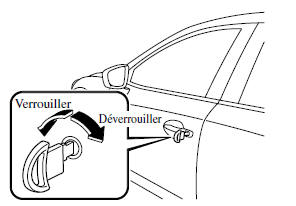
All doors and the luggage compartment lid lock automatically when the driver's door is locked using the key.
All doors unlock when the driver's door is unlocked and the key is held in the unlock position for one second or more.
Turn the key forward to lock, and backward to unlock.
NOTE
Holding the key in the unlock position in the driver's door lock for about one second unlocks all doors. To unlock only the driver's door, insert the key into the driver's door lock, turn it briefly to the unlock position, then immediately return it to the center position.
Locking and Unlocking with the Control Switch (with Advanced Remote Function)
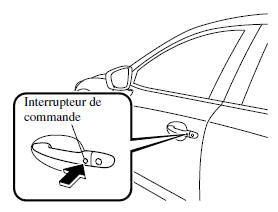
All doors and the luggage compartment lid can be locked/unlocked by pressing the control switch on the front doors when the driver is carrying the key.
Front Doors
To Lock
To lock all doors and the luggage compartment lid, press the control switch; the hazard warning lights will flash once.
A beep sounds once.
To Unlock
Driver's Door Control Switch
To unlock the driver's door, press the control switch. A beep sounds twice and the hazard warning lights flash twice.
To lock all doors, press the control switch again within 3 seconds; a beep then sounds twice.
Front Passenger's Door Control Switch
To unlock all doors, press the control switch.
A beep sounds twice and the hazard warning lights flash twice.
NOTE
- The system can be configured to unlock all doors in one operation. Refer to Customization Functions on page 9-9.
Use the following procedure to change the setting.
- Turn the ignition off and close all doors and the luggage compartment lid.
- Open the driver's door.
- Within 30 seconds of opening the driver's door, press and hold the UNLOCK button on the key for 5 seconds or more. When you hear the door lock/unlock operation sound, the system switches to the new setting. If you want to continue changing the setting after that, the system cycles through the available settings and sounds that the door lock/unlock operation emits each time you press the UNLOCK button on the remote transmitter.
- The setting is changed by following one of the procedures below:
- Turn the ignition to ACC or ON.
- Close the driver's door.
- Open the luggage compartment lid.
- The key is not operated for 10 seconds.
- Press any button except the UNLOCK button on the key.
- A control switch is pressed.
- Check that all doors and the luggage compartment lid are securely locked.
- It is not possible to lock all doors and the luggage compartment lid when any door is open.
- Once the control switch is pressed, unlocking the doors may take a few seconds.
- A confirmation beep sounds when the doors and the luggage compartment lid are locked/unlocked using the control switch. If desired, the beep can also be turned off. The beep volume can also be changed. Refer to Customization Functions on page 9-9.
Use the following procedure to change the setting.
- Turn the ignition off and close all doors and the luggage compartment lid.
- Open the driver's door.
- Within 30 seconds of opening the driver's door, press and hold the LOCK button on the key for 5 seconds or more. All doors and the luggage compartment lid lock, and the beep sounds at the currently set volume. (If the beep is currently set not to sound, it will not sound.) The setting changes each time the LOCK button on the key is pressed, and the beep sounds at the set volume. (If the beep is currently set not to sound, it will not sound.)
- The setting is changed by following one of the procedures below:
- Turn the ignition to ACC or ON.
- Close the driver's door.
- Open the luggage compartment lid.
- The key is not operated for 10 seconds.
- Press any button except the LOCK button on the key.
- A control switch is pressed.
(With anti-theft system) The hazard lights flash when the anti-theft system is armed or disarmed.
Refer to Anti-Theft System on page 3-45.
This setting can be changed so that the doors and trunk lid lock automatically without pressing the control switch.
Refer to Customization Features on page 9-9.
(Auto-lock function) Three seconds after the doors are closed, and if the key is no longer within the operating range, the doors and trunk lid will lock automatically. The hazard lights will flash once. (Even if the driver remains within the operating range, all doors and the trunk lid will lock automatically after approximately 30 seconds.) If the driver leaves the operating range before the doors and trunk lid are fully closed, or if another key is left in the vehicle, the auto-lock will not operate. Always check that all doors and the trunk lid are closed and locked before leaving the vehicle. The auto-lock function does not close the power windows.
(Auto-relock function) After unlocking with the control switch, all doors and the trunk lid will lock automatically if any of the following operations is not performed within approximately 60 seconds.
If the vehicle is equipped with an anti-theft system, the hazard lights will flash to confirm.
The time after which the doors automatically lock can be changed.
Refer to Customization Features on page 9-9.
- A door or the trunk lid is open.
- The ignition switch is set to a position other than OFF.
Locking and unlocking with the remote control
All doors and the trunk lid can be locked/unlocked by pressing the buttons on the remote control. See Remote Keyless Entry System (page 3-3).
Locking and unlocking with the door lock switch
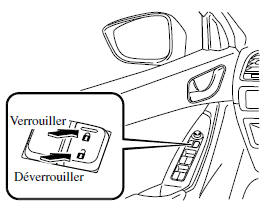
All doors and the trunk lid lock automatically when the lock side is pressed.
All doors unlock when the unlock side is pressed.
Driver's door

Front passenger's door
To lock all doors and the trunk lid from an open front door, press the lock side of the door lock switch, then close the door.
NOTE
When locking the doors this way, take care not to leave the key in the vehicle.
Auto-lock/unlock function
WARNING
Do not pull the interior handle of a front door:
It is dangerous to pull the interior handle of a front door while the vehicle is moving.
Passengers may fall from the vehicle if a front door opens accidentally, and suffer serious or fatal injuries.
- When the vehicle speed exceeds 20 km/h, all doors and the trunk lid lock automatically.
- When the ignition switch is set to OFF, all doors unlock automatically.
These functions can also be disabled so that they do not activate.
Changing the auto-lock/unlock function setting using the door lock switch
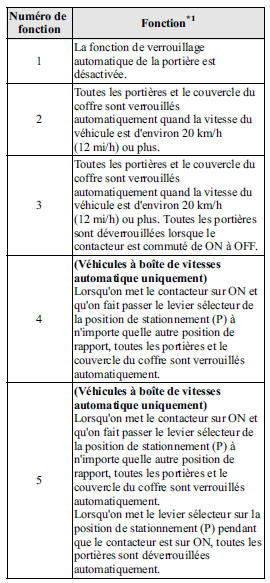
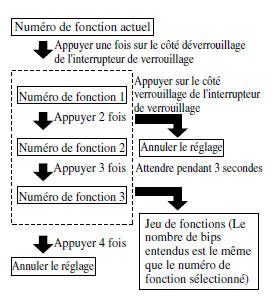
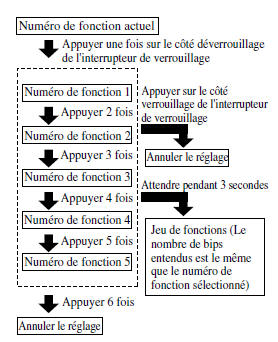
The doors and trunk lid can be set to lock or unlock automatically by selecting any of the functions listed in the following table and using the driver's door lock switch on the interior door panel to change the setting, as shown in the following procedure.
The settings can be changed as follows.
NOTE
- Function number 3 is the factory setting for your vehicle.
- Only five auto-lock/unlock settings in total are available for vehicles with an automatic transmission, and three for vehicles with a manual transmission. Be sure to press the unlock side of the driver's door lock switch the correct number of times, according to the function number selected. If the switch is pressed six times by mistake on a vehicle with an automatic transmission, or four times on a vehicle with a manual transmission, the procedure will be cancelled. If this happens, start the procedure again from the beginning.
*1 Other settings for the auto-lock function are available from an authorized Mazda dealer. For details, contact an authorized Mazda dealer.
Refer to Customization Features on page 9-9.
- Park the vehicle in a safe place.
All doors must remain closed.
- Turn the ignition switch to ON.
- Within 20 seconds or less after turning the ignition switch to ON, press and hold the lock side of the driver's door lock switch, and make sure a beep sounds about eight seconds later.
- Refer to the automatic door lock/unlock function setting table to determine the function number for the desired setting. Press the unlock side of the driver's door lock switch the correct number of times for the selected function number (e.g., for function 2, press the unlock side of the switch only 2 times).
- Three seconds after the function setting has been changed, a beep will sound the number of times corresponding to the selected function number. (e.g., function number 3 = 3 beeps)
(Manual transmission vehicles)
(Automatic transmission vehicles)
NOTE
- The doors cannot be locked or unlocked while the function setting is being changed.
- The procedure can be cancelled by pressing the lock side of the driver's door lock switch.
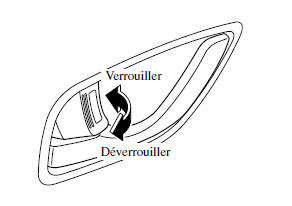
Locking and unlocking using the interior lock control
To lock a door from the inside, press the lock control.
To unlock, pull it outward.
This control does not operate the locks of the other door.
To lock the front passenger door using the exterior lock control, push the door lock control to the locked position and close the door (it is not necessary to keep the door handle pulled).
This control does not operate the locks of the other door.
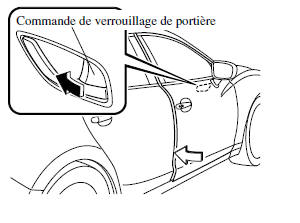
NOTE
When the door is locked using this method:
- Take care not to leave the key inside the vehicle.
- The driver's door lock control cannot be used when the driver's door is open.
- The red indicator is visible when the door lock control is unlocked.

Rear door child safety locks
These locks are designed to prevent children from accidentally opening the rear doors. Use them whenever a child is in the vehicle.
If the safety lock is pushed to the locked position before closing the door, the door cannot be opened from the inside. To open it, pull the outside door handle.

Test yourself
A quick Mazda 6 quiz: every answer comes with an explanation and a link to the manual page.