AMG menu in AMG vehicles
Designed especially for sporty drivers: the AMG menu of the Mercedes E-Class (4th gen., W212, 2009–2016) provides displays for oil and coolant temperature, upshift indicators and the RACETIMER. These functions support precise analysis during dynamic driving on closed tracks and enhance the sporty driving experience.
AMG displays
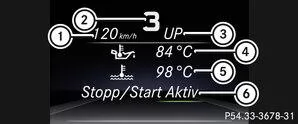
 |
Digital speedometer |
 |
Gear indicator |
 |
Upshift Indicator |
 |
Engine oil temperature |
 |
Coolant temperature |
| ECO Start-Stop function status display |
 Using the
 or
 On the steering wheel, select the AMG menu.
Upshift indicator: The upshift indicator UPindicates that the engine has reached the over-revving range in the manual driving program.
Engine oil temperature: When the engine and transmission are at operating temperature, the multifunction display shows the oil temperaturein white.
in blue, the engine or transmission is not yet at operating temperature. Avoid driving at full engine power during this time.SETUP
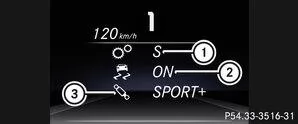
|
Driving program C / S / S+ / M |
|
ESP mode ON / OFF or SPORT handling mode SPORT |
|
Suspension setting COMFORT / SPORT / SPORT + |
Using theorOn the steering wheel, select the AMG menu.
Press repeatedly until SETUP is displayed.
or
Briefly press the AMG button on the center console .RACETIMER
Display and start the RACETIMER
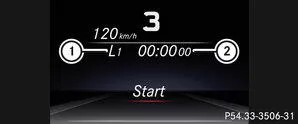
|
Lap |
|
RACETIMER |
When the engine is running or the key is in position 2 in the ignition lock, you can start the RACETIMER.
Using theorOn the steering wheel, select the AMG menu.Presspress until the RACETIMER is displayed.
Start: With start the RACETIMER.
Display split time
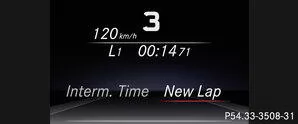
Using theorSelect Interm. Time.
Using theconfirm.
Start new lap
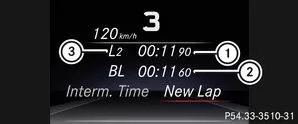
|
RACETIMER |
|
Fastest lap time (Best Lap) |
|
Lap |
Using theConfirm New Lap.Info

You can store a maximum of 16 laps. Lap 16 can only be ended with Finish Lap.
Stop RACETIMER

Button button on the steering wheel.
Select Yes and confirm withconfirm.
If you stop the vehicle and turn the key to position 1 in the ignition lock, the RACETIMER interrupts timing. If you turn the key to position 3 and thenconfirm with Start, timing continues.
Reset current lap
Stop the RACETIMER.Using theorSelect Reset Lap.
Using thereset the lap time to "0".Delete all laps
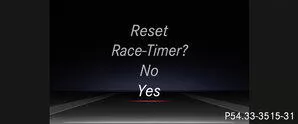
If you switch off the engine, the RACETIMER resets to "0" after 30 seconds. All laps are deleted.
You cannot delete stored laps individually. If you have stopped 16 laps, the current lap does not need to be reset.Reset the current lap.
Using theConfirm reset.
Using the Select Yes and pressconfirm.
Overall evaluation
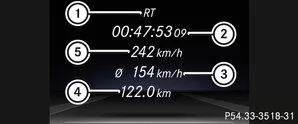
|
RACETIMER overall evaluation |
|
Total driving time |
|
Average speed |
|
Total distance driven |
|
Maximum speed |
Using theorOn the steering wheel, select the AMG menu.
PressPress until the overall evaluation is displayed.
Lap evaluation
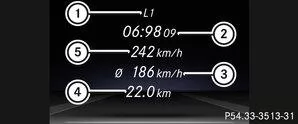
|
Lap |
|
Lap time |
|
Average lap speed |
|
Lap length |
|
Maximum lap speed |
Using theorOn the steering wheel, select the AMG menu.
PressPress until a lap evaluation is displayed.
. Using theorselect a different lap evaluation.
The AMG menu of the Mercedes E-Class W212 AMG models (model years 2009–2016) provides sporty additional functions such as RACETIMER, digital displays and setup displays. These functions emphasise the sporty character and support the driver on closed circuits.
With clear displays and precise information, every sporty drive is optimally supported and recorded.
Question: What is the RACETIMER for?
Answer: It measures and stores lap times for use on racetracks.
Question: What information does the AMG setup show?
Answer: Driving program, ESP mode and suspension setting.
Test yourself
A quick Mercedes-Benz E-Class quiz: every answer comes with an explanation and a link to the manual page.