Navigation menu
Reach your destination safely: the “Navigation” menu in the Mercedes E-Class (4th gen., W212, 2009–2016) shows precise route information, recommended lanes and the next maneuvers. Even without active route guidance, it provides useful data on the current road and direction. The intuitive display helps you handle traffic with ease.
Show navigation instructions
In the Navi menu, the multifunction display shows the navigation instructions.For more information on navigation, see the separate Audio 20 or COMAND Online operator's manual.
 Switch on Audio 20 or COMAND Online (see separate operator's manual).
Using the or
 Select the Navi menu on the steering wheel.
Route guidance not active
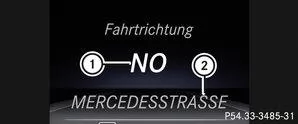
 |
Direction of travel |
 |
Current road |
Route guidance active
No maneuver announced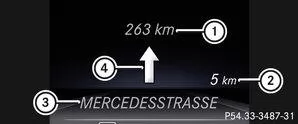
|
Distance to destination |
|
Distance to next maneuver |
 |
Current road |
 |
“Follow the road” symbol |
Maneuver announced without lane recommendation
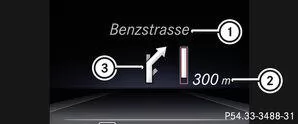
|
Road the maneuver leads into |
|
Distance to maneuver and graphic distance display |
|
Maneuver symbol |
a graphic distance display. It shrinks from bottom to top as you get closer to the announced maneuver.Maneuver announced with lane recommendation
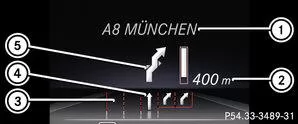
|
Road the maneuver leads into |
|
Distance to maneuver and graphic distance display |
|
Lanes not recommended |
|
Recommended lane and lane added during the maneuver |
 |
Maneuver symbol |
Lane not recommended: On this lane, it is not possible to carry out the maneuver without changing lanes.
: On this lane, it is possible to carry out the next and the second-next maneuver without changing lanes.Additional navigation status displays
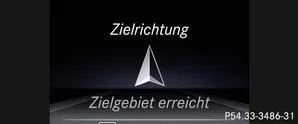
The navigation system shows you additional information and status.
Possible displays:- New route... or route calculation:
A new route is being calculated.
- Road not recognized:
The vehicle position is within the area of the digital map, but the road is not known, e.g. newly built roads, parking lots or private property.
- No route:
The route to the selected destination cannot be calculated.
 : You have reached the destination or an intermediate destination.
The navigation menu of the Mercedes E-Class W212 (model years 2009–2016) shows precise route guidance information. Clear symbols and distance information help the driver reach the destination safely and without stress.
Even in complex traffic situations, navigation with lane recommendations and graphic distance displays helps. Every journey in the E-Class becomes an example of modern technology and comfort.
Question: What does the navigation system show when there is no route guidance?
Answer: The current road and direction of travel are shown.
Question: When does the message “Road not recognized” appear?
Answer: When the vehicle is on a road that is not stored in the map data, e.g. in parking lots or on new roads.
Test yourself
A quick Mercedes-Benz E-Class quiz: every answer comes with an explanation and a link to the manual page.