Assist menu
In the "Assist" menu of the Mercedes E-Class (4th gen., W212, 2009–2016), systems such as DISTRONIC PLUS or Blind Spot Assist can be individually adjusted. The assist graphic shows the current status at a glance, supporting the interaction between driver and technology to enhance safety.
Introduction
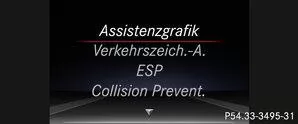
Depending on your vehicle's equipment, the following options are available in the Assist. menu:
- Display assist graphic
- Switch the traffic sign assist messages on or off
- Switch ESP on or off (except AMG vehicles)
- Switch Steering Assist and Stop&Go Pilot of DISTRONIC PLUS on or off
- Switch PRE-SAFE Brake on or off
- Switch COLLISION PREVENTION ASSIST PLUS on or off
- Switch ATTENTION ASSIST on or off
- Switch Blind Spot Assist or Active Blind Spot Assist on or off
- Switch Lane Keeping Assist or Active Lane Keeping Assist on or off
Display assist graphic
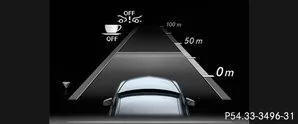
 Using the
 or
 Select the Assist. menu on the steering wheel.
Using the or
 Select the assist graphic.
Using the press.
- Traffic Sign Assistant
- DISTRONIC PLUS
- PRE-SAFE Brake
- COLLISION PREVENTION ASSIST PLUS
- ATTENTION ASSIST
- Lane keeping assist
- Active Lane Keeping Assist
- Rear window wiper
Using theCall up the ATTENTION ASSIST evaluation.
Switch the traffic sign assist messages on or off
Using theorSelect the Assist. menu on the steering wheel.
Using theorSelect Traffic Sign Assist.Using thepress.
Switch on or off: Presspress.Further information on Traffic Sign Assist .
Switching ESP on or off
Info
WARNING
If you switch off ESP, ESP does not stabilize the vehicle. There is an increased risk of skidding and accidents!Only switch off ESP while the situations described below apply.
In the following situations, it may be better to switch off ESP:
- when driving with snow chains
- in deep snow
- on sand or gravel
More information on ESP.
Start the engine.Using theorSelect the Assist. menu on the steering wheel.
Using theorSelect ESP.Using thepress.To switch on or off: press again onpress.
 lights up in the instrument cluster with the engine running, ESP is switched off.
If the warning lamp and the warning lamplights up continuously, ESP is unavailable due to a malfunction.
Observe the information on display messages.
Switch PRE-SAFE Brake on or off
PRE-SAFE Brake is only available in vehicles with DISTRONIC PLUS.Using theorSelect the Assist. menu on the steering wheel.
Using theorSelect PRE-SAFE Brake.
Using thepress.
To switch on or off: press again onpress.More information on PRE-SAFE Brake.
Switch COLLISION PREVENTION ASSIST PLUS on or off
Using theorSelect the Assist. menu on the steering wheel.Using theorSelect Collision Prevent.
Using thepress.
To switch on or off: press again onpress.More information on COLLISION PREVENTION ASSIST PLUS.
Switching Steering Assist and Stop&Go Pilot on or off
Using theorSelect the Assist. menu on the steering wheel.Using theorDTR+: Select Steering Assist.
Using thepress.To switch on or off: press again onpress.More information on DISTRONIC PLUS with Steering Assist and Stop&Go Pilot.
Switch ATTENTION ASSIST on or off
Using theorSelect the Assist. menu on the steering wheel.Using theorSelect Attention Assist.
Using thepress.Using theconfirm.
Using theorSet to Off, Standard or Sensitive.Using thesave the setting. on.
More information on ATTENTION ASSIST.
Switching Blind Spot Assist on or off
Using theorSelect the Assist. menu on the steering wheel.Using theorSelect Blind Spot Assist.
Using thepress.To switch on or off: press again onpress.
More information on Active Blind Spot Assist.
Switching Lane Keeping Assist on or off
Using theorSelect the Assist. menu on the steering wheel.Using theorSelect Lane Keeping Assist.
Using thepress.Using theconfirm.
Using theorSet to Off, Standard or Adaptive.Using thesave the setting.More information on Lane Keeping Assist.
More information on Active Lane Keeping Assist.
The assistance menu of the Mercedes-Benz E-Class W212 (model years 2009–2016) provides access to important safety systems. The driver can individually control systems such as ESP, ATTENTION ASSIST or Blind Spot Assist and increase driving comfort.
With these options, the E-Class underlines its leading position in active safety and driver assistance.
Test yourself
A quick Mercedes-Benz E-Class quiz: every answer comes with an explanation and a link to the manual page.