Trip menu
Whether fuel consumption, ECO ratings or digital speed display, the "Trip" menu of the Mercedes E-Class (4th generation, W212, 2009–2016) offers an impressive range of information. Drivers can specifically analyze and optimize their driving style to travel more economically and efficiently. The clear display helps you keep track of things even on longer journeys.
Standard display
 The button
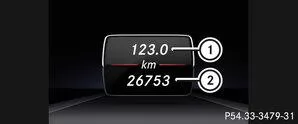
 Press and hold on the steering wheel until the trip menu with daily distance
 and total distance
 is shown.
Trip computer "From Start" or "From Reset"
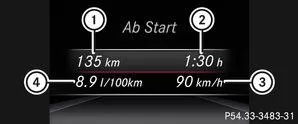
|
Distance |
|
Driving time |
 |
Average speed |
 |
Average Fuel Consumption |
Using the or
 Select the trip menu on the steering wheel.
Using the or
 Select From Start or From Reset.
The "From Start" trip computer is automatically reset in the following cases:
- The ignition has been switched off for more than four hours.
- 999 hours have been exceeded.
- 9999 miles have been exceeded.
ECO display
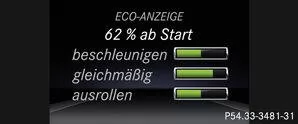
Using theorSelect the trip menu on the steering wheel.
Using theorSelect ECO DISPLAY.
If the ignition has been switched off for more than four hours, the ECO display is automatically reset.
More information on the ECO display.Display range and current fuel consumption
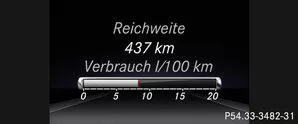
Fuel consumption is not shown in AMG vehicles.
Using theorSelect the trip menu on the steering wheel.Using theorSelect the current fuel consumption and the approximate range.
 is shown.
Digital speedometer
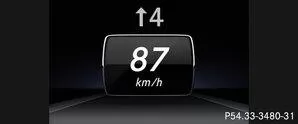
Using theorSelect the trip menu on the steering wheel.
Using theorSelect the digital speedometer.
 .
Observe the information on the gear shift indicatorfor manual transmission or automatic transmission (manual shifting) .
Resetting values
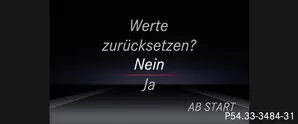
Using theorSelect the trip menu on the steering wheel.
Using theorSelect the function you want to reset.
Using the press.
Using theSelect Yes and pressconfirm.
You can reset the values of the following functions:
- Daily distance
- Trip computer "From Start"
- Trip computer "From Reset"
- ECO display

The trip menu of the Mercedes E-Class W212 (model years 2009–2016) provides precise information about the journey, such as distance, driving time and fuel consumption. The clear layout makes it easier for the driver to adapt their driving style efficiently.
The ECO display in particular helps to optimize fuel consumption. With clear feedback, it helps develop an environmentally friendly and economical driving style. This underlines the E-Class's commitment to efficiency and comfort.
Test yourself
A quick Mercedes-Benz E-Class quiz: every answer comes with an explanation and a link to the manual page.