Forward distance indication
The forward distance indication shows the distance to the moving vehicle ahead. Depending on the vehicle equipment, the system uses the radar behind the radiator grille or the front camera in the windshield to detect the distance to a vehicle directly ahead in the same lane. The system is active at speeds above 40 km/h.
When a vehicle is detected ahead, the distance is shown in seconds on a page of the Driver Information Center 101. Press the MENU button on the turn signal lever to select the Vehicle Information menu and turn the adjustment wheel
to select the forward distance display page.
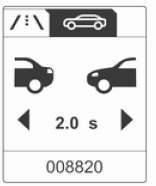 The minimum distance displayed is
0.5 s.
If there is no vehicle ahead or the vehicle ahead is out of range, two dashes are shown: -.- s.
Test yourself
A quick Opel Insignia quiz: every answer comes with an explanation and a link to the manual page.