Traffic Sign Assist
Operation
The Traffic Sign Assist detects certain road signs using a front camera and displays them in the driver information center.
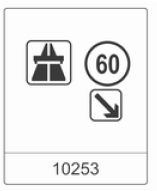 The road signs that will be detected are:
Speed limit and no-passing signs
- speed limit;
- no passing;
- end of speed limit;
- end of no passing.
Road signs
beginning and ending with:
- motorways;
- expressways / controlled-access roads;
- residential / living street zones;
Additional signs
- supplementary information signs;
- trailer restriction;
- slippery road;
- icy road;
- directional arrows.
Speed limit signs are shown in the driver information center until the next speed limit sign or end-of-speed-limit sign is detected, or after a set signal timeout.
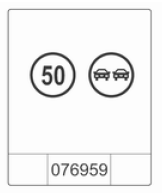
Combinations of several signs in the display are possible.
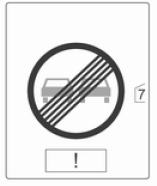 An exclamation mark in a
frame indicates that an additional sign has been detected which the system could not recognize.
The system is active up to a speed of 200 km/h, depending on the lighting conditions. At night, the system is active up to a speed of 160 km/h.
As soon as the speed drops below 55 km/h, the display is reset and the contents of the road sign page are cleared. The next recognized speed sign will be displayed.
Display indication
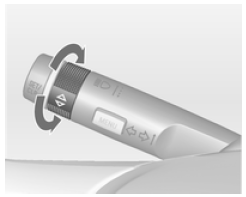
Road signs are displayed on the Traffic Sign Detection page of the driver information center by selecting with the thumbwheel on the turn signal lever 101.
When another function has been selected in the driver information center menu and the Traffic Sign Detection page is selected again, the last recognized road sign will be displayed.
If the system switches off automatically, the contents of the road sign page are cleared (this is not provided if the vehicle has a navigation system), which is indicated by the following symbol:
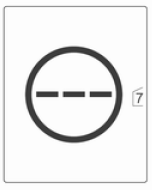 The contents of the
road sign page are also cleared while driving when the SET/CLR button on the turn signal lever is pressed and held for a longer time.
Overlay function
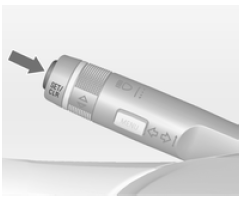
Speed limits and no-passing signs are displayed as overlays in the driver information center.
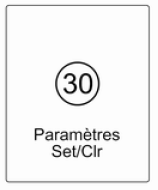 The overlay function can
be deactivated on the road sign page by pressing the SET/CLR button on the turn signal lever.
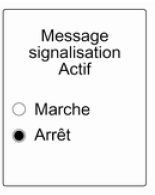 Once the settings page is displayed, select Off to deactivate the overlay function. Reactivate by selecting On. When the ignition is switched on, the overlay function is deactivated.
The overlay indication is displayed for approximately 8 seconds in the driver information center.
Traffic sign detection in combination with the navigation system
If the vehicle is equipped with a navigation system, the following functions may be available:
- permanent display of the current speed limits;
- or in adverse weather conditions, navigation data for speed limits is displayed.
Malfunction
The Traffic Sign Assist may not function correctly when:
- the area of the windshield where the front camera is located is not clean;
- road signs are fully or partially covered or are difficult to identify;
- weather conditions are poor, such as heavy rain, snow, direct sunlight or shadows. In this case, No Sign Detection: Weather is shown in the display;
- road signs are incorrectly installed or damaged;
- road signs do not comply with the Vienna Convention on Road Signs and Signals.
Notice
The system is designed to help the driver recognize certain road signs within a given speed range. Do not ignore road signs that are not shown by the system.
The system does not detect other road signs that introduce or end a speed limit.
This feature must not encourage you to adopt a dangerous driving style.
Always adapt your speed to traffic conditions.
Driver assistance systems do not in any way reduce the driver's full responsibility.
Test yourself
A quick Opel Insignia quiz: every answer comes with an explanation and a link to the manual page.