Single-zone
Single-zone: this is overall control of cabin temperature, air distribution and air flow.
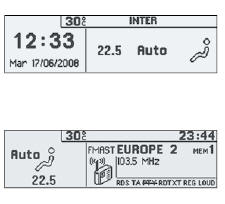
The symbols and messages associated with the automatic air conditioning controls appear on the multifunction display.
Operation using the Auto program
 Automatic comfort
program (1)
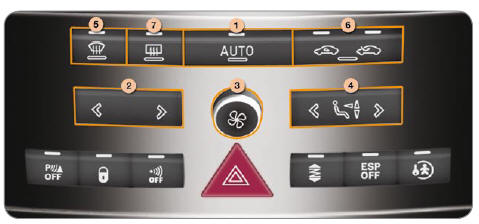
Press the "AUTO" button. The indicator light comes on. The "AUTO" symbol appears on the multifunction display.
Depending on the selected comfort level, the system manages air distribution, air flow, temperature and air intake to ensure comfort and sufficient air circulation in the cabin. No further action is required.
With a cold engine, to avoid too much cold air being delivered, ventilation will only reach its optimum level gradually.
Temperature adjustment (2)
 Press the right or left
arrow to change it.
The value shown on the display corresponds to a comfort level, not to a temperature in degrees Celsius or Fahrenheit, depending on the unit selected in the display settings.
A setting around the value 21 provides optimum comfort.
However, depending on your needs, a setting between 18 and 24 is common.
When you get into the vehicle, the temperature inside may be much colder (or warmer) than the comfort temperature. There is no need to change the displayed temperature to reach the desired comfort quickly.
The automatic air conditioning control will use its maximum capacity to offset the temperature difference as quickly as possible.
Manual control operation
It is possible to adjust one or more functions manually, while keeping the other functions in automatic mode.
Switching to manual mode may cause discomfort (temperature, humidity, odour, misting) and is not optimal for comfort.
To return to automatic mode, press the "AUTO" button.
Blower (3)
Airflow
 Turn
dial 3 to the right to increase or to the left to decrease the airflow.
The "AUTO" button indicator light goes off.
The airflow symbol (fan) appears on the multifunction display and fills up according to the requested value.
To prevent misting and a decline in cabin air quality, make sure the airflow is sufficient.
Turning off the ventilation
 Turn
dial 3 to the left until the airflow stops.
The "OFF" symbol appears on the multifunction display.
This action switches off the display and the indicator lights.
It deactivates all system functions, except rear window defrosting.
Thermal comfort is no longer controlled (temperature, humidity, odour, misting).
Avoid driving for too long with the air conditioning switched off.
To reactivate the air conditioning:
- Press button 1 .
 Air distribution
adjustment (4)
Press button 4 once or repeatedly to change the airflow direction.
The "AUTO" button indicator light goes off.
The arrow symbol corresponding to the selected direction appears on the multifunction display.
 Windscreen and front side
windows.
 Upper and rear vents.
 Front and rear footwells.
AUTO Automatic distribution.
 Front visibility
control (5)
In some cases, the comfort programme may not be sufficient to demist or defrost the windows (humidity, many passengers, frost).
- Then select the front visibility programme to quickly clear the windows. The indicator light comes on.
It controls cooling, airflow and air intake, and distributes air to the windscreen and front side windows.
The front visibility control symbol appears on the multifunction display.
Once the problem has cleared, press button 1 to return to the comfort setting.
 Outside air intake /
Interior air recirculation (6)
This function isolates the cabin from outside odours and fumes.
Press button 6 repeatedly to force the air intake mode; the indicator light for the selected mode comes on:
- outside air intake. Forced outside air intake mode.
- recirculation of the air inside the cabin.
The indicator light for the forced mode comes on. Prolonged use of interior air recirculation may cause misting and reduce interior air quality.
Do not drive for long periods in recirculation mode, except in truly exceptional atmospheric conditions.
The message associated with the control appears on the multifunction display.
Press button 6 to return to automatic air intake control. Both indicator lights go off.
For your comfort, settings are retained between two starts of the vehicle.
 Rear window
defrost (7)
The heated rear window operates independently of the air conditioning system.
- With the engine running, press button 7 to defrost the rear window and the exterior mirrors.
The indicator light comes on.
It switches off automatically to avoid excessive power consumption, depending on the outside temperature.
It can be interrupted by pressing button 7 again or when the engine is switched off.
However, defrosting will resume at the next engine start if the engine was switched off for less than one minute.
Switch off rear window and exterior mirror defrosting as soon as you judge it unnecessary, as low power consumption reduces fuel consumption.
"CLIM" menu
 Press the
"MENU" button to access the general menu, then confirm.
The "General menu" appears on the multifunction display.
 Select
the Air conditioning icon using the navigation buttons.
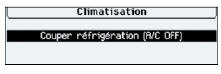
The "Air conditioning" menu appears on the multifunction display, as the main display.
Deactivating cooling (AC-OFF)
 Deactivation
may cause discomfort (temperature, humidity, odour, misting).
The "AC OFF" symbol appears on the multifunction display.
The set temperature may not be reached and you may get misting on the windows.
You can cancel deactivation by pressing the "AUTO" button on the air conditioning control panel.
Auxiliary heater *
Vehicles fitted with HDI engines may be equipped with an automatic auxiliary heater to improve your comfort.
With the engine idling or the vehicle stationary, a high-pitched whistle and some smoke and odours are normal.
Test yourself
A quick Peugeot 407 quiz: every answer comes with an explanation and a link to the manual page.