RENAULT card with remote control transmitter: how to use
Unlocking the doors and covers
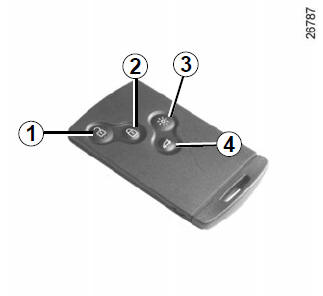
Press button 1.
Unlocking is confirmed by one flash of the hazard warning lights.
When unlocking only the driver's door is selected:
- pressing button 1 unlocks only the driver's door lock and the fuel filler flap;
- pressing button 1 twice in succession unlocks all locks.
Locking the doors and boot lid
Press lock button 2. Locking is confirmed by two flashes of the hazard warning lights. If one of the opening elements (a door or the boot lid) is open or not fully closed, or the RENAULT card has been left in the card reader, the locks engage quickly and then disengage again without the hazard warning lights flashing.
If the vehicle has been unlocked but none of the opening body elements has been opened, the locks are automatically locked again after two minutes. When the engine is running, the card buttons are inactive.The flashing of the hazard warning lights indicates the vehicle status:
- one flash indicates that the vehicle locks are fully unlocked;
- two flashes indicate that the vehicle locks are fully locked.
Unlocking/locking the boot lock
Press button 4 to unlock/lock the boot lock.
Alarm indicating that the RENAULT card has not been detected
If a door is opened while the engine is running and the card is not in the card reader, the message "CARD NOT DETECTED" is displayed and an audible signal sounds.
The warning message disappears when the card is reinserted into the card reader.
"Remote lighting" function
Pressing button 3 switches on the interior lighting for about 30 seconds.
This function makes it easier to find the vehicle, for example in a car park.
Note: pressing button 3 again switches off the lighting.
Test yourself
A quick Renault Clio quiz: every answer comes with an explanation and a link to the manual page.