Automatic air conditioning
Automatic Air Conditioning
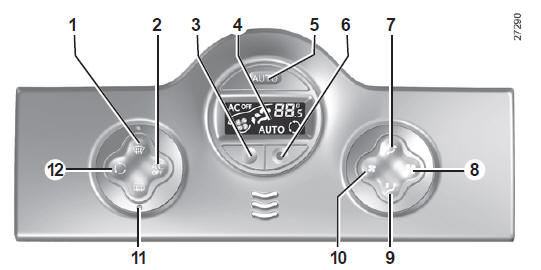
Controls (depending on vehicle)
- "Clear view" button for defogging and defrosting the windows.
- Air conditioning off.
- and 6 - Air temperature adjustment.
- Display.
- Activating automatic mode.
7 and 9 - Air distribution adjustment in the cabin.
8 and 10 - Fan speed adjustment.
- Defrosting the rear window and heated mirrors.
- Air recirculation control.
Information and Operating Tips
Refer to the "Air conditioning: information and operating tips" section.
Automatic Mode
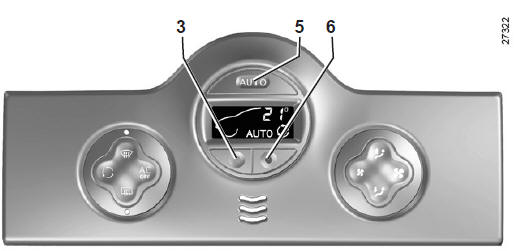
Press button 5. The AUTO indicator light comes on.
Automatic air conditioning maintains (except in extreme conditions) the cabin comfort and good visibility while optimizing fuel consumption.
This is the recommended mode of operation.
To reach and maintain the selected comfort level and good visibility, the system controls:
- the fan speed;
- the air distribution;
- the air recirculation;
- the switching on or off of the air conditioning;
- the air temperature.
Only the temperature and the AUTO symbol are displayed.
The functions controlled by automatic mode are not displayed.
- press button 6 to increase the temperature;
- press button 3 to decrease the temperature.
Note: the extreme settings "15 °C" and "27 °C" allow the system to produce maximum cooling or maximum heating regardless of the ambient conditions.
In automatic mode (AUTO indicator lit on the display), all air conditioning functions are controlled by the system.
When you change certain functions, the AUTO indicator goes off.
Only the changed function is no longer controlled by the system.
The displayed temperature values indicate a comfort level.
When starting the vehicle, increasing or decreasing the displayed value will in no way reach the comfort level more quickly. The system always optimizes the cooling or heating process (the fan does not start instantly at maximum speed; it increases gradually). This can take from a few seconds to several minutes.
In general, unless there is a specific discomfort, the dashboard vents should always remain open.
Changing Automatic Mode
Normal operation of the system is automatic mode, but you may change the setting selected by the system (air distribution, etc.). These options are described on the following pages.
Automatic mode is the recommended mode of operation.
Automatic air conditioning maintains (except in extreme conditions) the cabin comfort and good visibility while optimizing fuel consumption.
The options for making changes are described on the following pages.
Return to automatic mode as soon as possible.
Air distribution in the passenger compartment
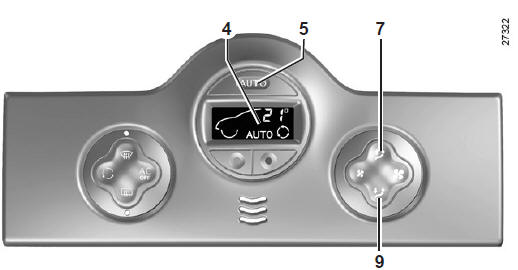
There are five possible air distribution combinations, selected by pressing buttons 7 and 9 successively. The arrows on display 4 show the selected setting:
 Air is directed to the windshield and side window defrost vents.
 Air is directed to the windshield and side window defrost vents and the passenger footwells.
 Air is mainly directed to the dashboard vents. This setting heats or cools the cabin more quickly.
 Air is directed to all vents and to the passenger footwells.
 Air is directed mainly to the passenger footwells.
Manually selecting the air distribution turns off the operating indicator on display 4 (automatic mode), but only the air distribution is no longer controlled automatically by the system.
To return to automatic mode, press button 5.
Changing the fan speed
In automatic mode, the system manages the fan speed best suited to reach and maintain comfort.
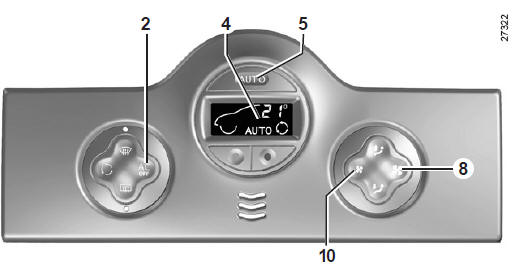
Pressing buttons 8 and 10 takes you out of automatic mode.
These buttons increase and decrease the fan speed.
Switching the air conditioning on or off
In automatic mode, the system switches the air conditioning on or off according to outside weather conditions.
Pressing button 2 takes you out of automatic mode: the AUTO indicator on display 4 goes off.
Automatic Air Conditioning
Note: the "clear view" function automatically activates the air conditioning. To return to automatic mode, press button 5.
In automatic mode, the fan may not start at maximum speed depending on outside conditions: it increases until the engine temperature is high enough to heat the cabin air. This can take from a few seconds to several minutes.
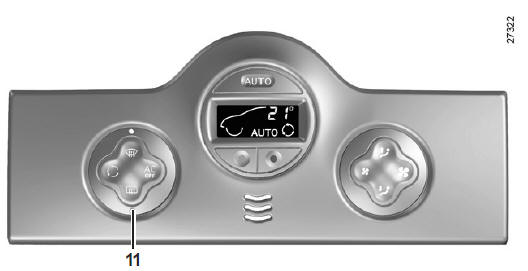
Defogging and Defrosting the Rear Window
Press button 11.
This function provides rapid electric defogging of the rear window and, depending on vehicle, the electric heated mirrors.
To exit this function, press button 11 again. Otherwise, defogging stops automatically.
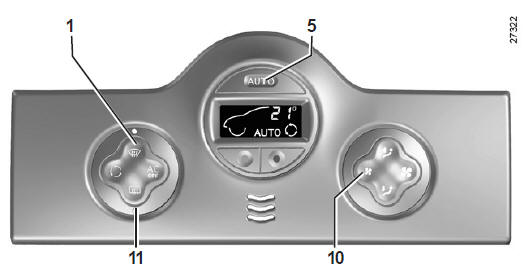
"Clear View" Function
Press button 1.
The AUTO button indicator (located in the display) goes off.
This function provides rapid defrosting and defogging of the windshield, the front side windows and the mirrors.
It automatically switches on the air conditioning and the rear window defroster, and cancels air recirculation.
Press button 11 if you do not want the rear window defroster to switch on.
Note: to reduce airflow (which may produce some noise in the cabin), adjust button 10.
To exit this function, you can press:
- or press button 1 again;
- or press button 5 (the AUTO indicator lights up on the display).
Air recirculation
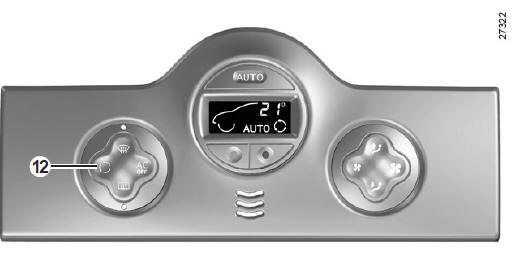
Air recirculation
Press button 12 to activate air recirculation (the symbol lights up on the display).
During recirculation, air is taken from the cabin and recirculated without admitting outside air.
Air recirculation isolates the cabin from outside air (driving in polluted areas, etc.).
Prolonged use of this setting may cause odours due to the lack of fresh air, and may cause the windows to fog up.
We therefore recommend returning to normal operation (outside air or automatic recirculation) by pressing button 12 again as soon as air recirculation is no longer needed.
Test yourself
A quick Renault Kangoo quiz: every answer comes with an explanation and a link to the manual page.