Convenient Features of Your Vehicle
How to Deactivate the Smart Trunk Function Using the Smart Key
In this manual: Convenient Features of Your Vehicle
~1min read
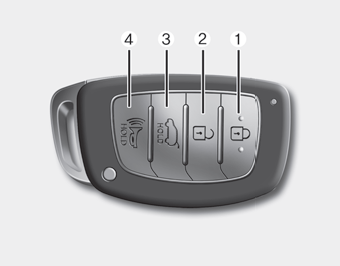
1. Door lock
2. Door unlock
3. Trunk open
4. Panic
If you press any smart key button during the detection and warning stage, the Smart Trunk function will be deactivated.
Make sure you know how to deactivate the Smart Trunk function for emergency situations.
Information
- If you press the door unlock button (2), the Smart Trunk function will be temporarily deactivated. However, if you do not open any door within 30 seconds, the Smart Trunk function will be reactivated.
- If you press and hold the trunk open button (3) for more than 1 second, the trunk will open.
- If you press the door lock button (1) or the trunk open button (3) when the Smart Trunk function is not in the detection and warning stage, the Smart Trunk function will not be deactivated.
- If you have deactivated the Smart Trunk function by pressing the smart key button and opened a door, the Smart Trunk function can be reactivated by closing and locking all doors.
Test yourself
A quick Hyundai Sonata LF quiz: every answer comes with an explanation and a link to the manual page.
Was this page helpful?