Smart Key Oscillator (Front Floor)
Components
COMPONENTS
ILLUSTRATION
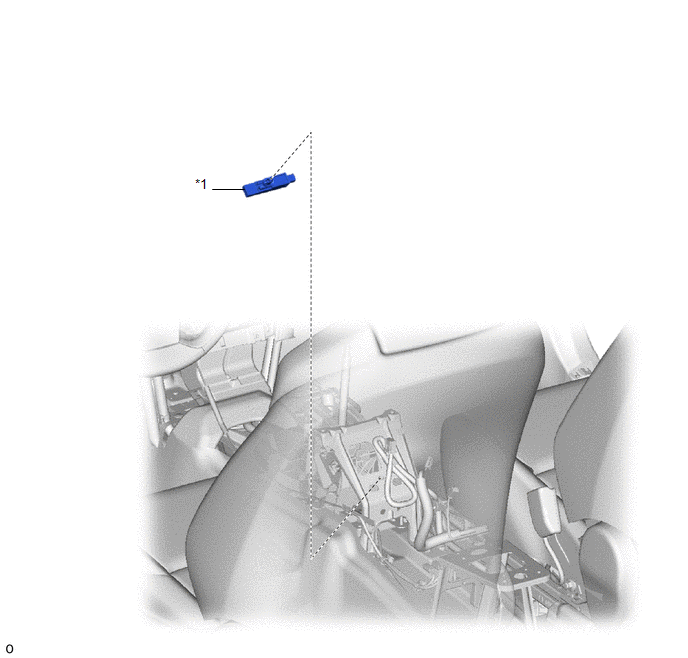
*1 |
NO. 1 INTERIOR SMART KEY ANTENNA ASSEMBLY |
- |
- |
Removal
REMOVAL
PROCEDURE
1. REMOVE REAR CONSOLE BOX ASSEMBLY
Click here
2. REMOVE NO. 1 INTERIOR SMART KEY ANTENNA ASSEMBLY
(a) Disconnect the connector.
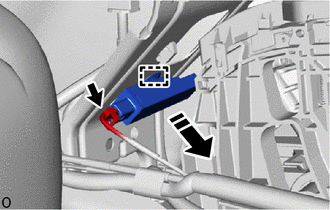
 |
Remove in this direction |
(b) Using a clip remover, release the clip to remove the No. 1 interior smart key antenna assembly as shown in the illustration.
NOTICE:
Be careful when removing the No. 1 interior smart key antenna assembly. If the No. 1 interior smart key antenna assembly is dropped, replace it with a new one.
Installation
INSTALLATION
PROCEDURE
1. INSTALL NO. 1 INTERIOR SMART KEY ANTENNA ASSEMBLY
(a) Engage the clip to reinstall the No. 1 interior electronic key antenna assembly, as shown in the illustration.
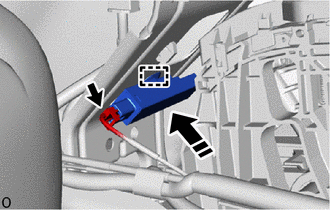
 |
Install in this direction |
NOTICE:
Be careful when installing the No. 1 interior electronic key antenna assembly. If the No. 1 interior electronic key antenna assembly is dropped, replace it with a new one.
(b) Connect the connector.
2. REINSTALL REAR CONSOLE BOX ASSEMBLY
Click here