Follow-me-home lighting system
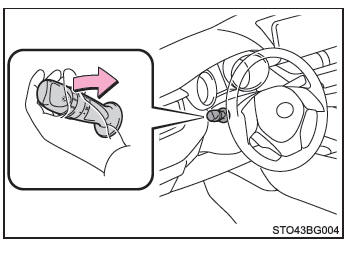
This system keeps the headlights on for 30 seconds after you turn the ignition switch off.
Pull the turn signal lever toward you and release it with the light switch set to , after turning the ignition switch off.
The lights turn off in the following situations.
- Vehicles without smart entry & start system: You turn the ignition switch to "ON".
Vehicles with smart entry & start system: You switch the ignition to START mode.
- You set the light switch to a running position.
- You pull the light switch toward you and then release it.
Manual headlight levelling switch (vehicles with halogen headlights)
You can adjust the headlight aim according to the number of passengers and the vehicle's loading conditions.
- Raises the headlight aim
- Lowers the headlight aim

■ Switch position guide
Occupancy and luggage load conditions |
Switch position |
|
| Occupants | Luggage load | |
| Driver | None | 0 |
| Driver and front passenger | None | 0.5 |
| All seats occupied | None | 1.5 |
| All seats occupied | Full luggage load | 2.5 |
| Driver | Full luggage load | 4 |
■ Daytime running light system To make your vehicle more visible to other road users during the day, the daytime running lights turn on automatically whenever you start the engine and release the parking brake while the light switch is set to . (The light is brighter than the front position lights.) The daytime running lights are not designed for use at night.
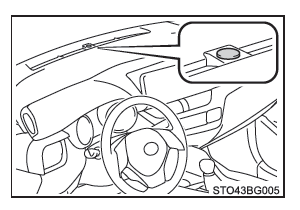
■ Light sensor
The sensor may not operate normally if it is covered by an object or blocked by an item attached to the windshield.
In such cases, the sensor cannot detect the ambient light level and may cause the automatic headlight system to malfunction.
■ Automatic light off system
Vehicles without a smart entry & start system
When the light switch is set to or to
 : The headlights and fog lights (if equipped) turn off automatically when the ignition switch is set to off.
When the light switch is set to : All lights turn off automatically when the ignition switch is set to off.
To turn the lights back on, set the ignition switch to "ON", or turn the light switch once to before setting it back to
 or .
Vehicles with a smart entry & start system
When the light switch is set to or to
 : The headlights and fog lights (if equipped) turn off automatically when the ignition switch is set to off.
When the light switch is set to : All lights turn off automatically when the ignition switch is set to off.
To turn the lights back on, set the ignition switch to START, or turn the light switch once to before setting it back to
 or
 .
■ Lights-on reminder chime
Vehicles without a smart entry & start system
A chime sounds and a message is displayed when the ignition switch is set to off or to "ACC" while the driver's door is open and the lights are on.
Vehicles with a smart entry & start system
A chime sounds and a message is displayed when the ignition switch is set to off or to ACC while the driver's door is open and the lights are on.
■ Automatic headlight leveling system (vehicles with LED headlights) The headlight aim is adjusted automatically according to the number of passengers and the loading conditions of the vehicle, so that other road users are not dazzled by the headlight beams.
■ Battery saver function Under the following conditions, the other lights turn off automatically after 20 minutes to prevent the vehicle battery from discharging:
- The headlights and/or tail lights are on.
- Vehicles without a smart entry and start system: The ignition switch is set to "ACC" or to off.
Vehicles with a smart entry and start system: The ignition switch is set to ACC or to off.
- The light switch is set to
 or
 .
This function is cancelled in any of the following situations:
- Vehicles without a smart entry and start system: When the immobilizer key is set to "ON".
Vehicles with a smart entry and start system: When the ignition switch is set to START.
- When the light switch is operated.
- When a door is opened or closed.
■ If the message "Headlight system malfunction. See dealer." is displayed on the multi-information display The system may be malfunctioning. Have the vehicle inspected by a Toyota dealer, a Toyota-authorized repairer, or any reliable repairer.
■ Customization Some functions can be customized (e.g., the sensitivity of the light sensor).
NOTE■ To prevent battery discharge Do not leave the lights on longer than necessary when the engine is off.