Diagnostic System
DIAGNOSTIC SYSTEM
DESCRIPTION
The main body ECU (multiplex network body ECU) stores DTCs when malfunctions occur.
The diagnostic system can read DTCs from data link connector 3.
Use the Techstream to check for possible malfunctions and carry out repairs.
CHECK DLC3
(a) Check DLC3.
Click here
CHECK BATTERY VOLTAGE
(a) Measure the battery voltage.
Standard voltage:
11 à 14 V
If the voltage is below 11 V, charge or replace the battery.
DIAGNOSTIC MODE (WITH TECHSTREAM)
(a) Connect the Techstream to the DLC3.
(b) Turn the engine switch to ON (IG).
(c) Turn on the Techstream.
(d) Select the following menus: Body Electrical / Smart Key / Utility / Wireless Door Lock Diagnosis Mode.
Body Electrical > Smart Key > UtilityWireless Door Lock Diagnosis Mode
(e) Proceed to the next step as instructed on the Techstream screen.
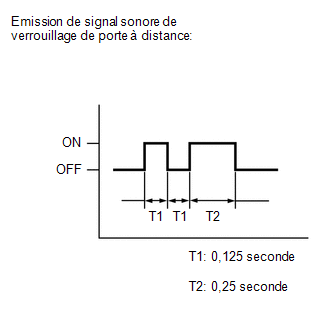
(f) Confirm that the system has entered diagnostic mode by checking the wireless door lock buzzer sound sequence.
(g) Check the diagnostic output when a switch on the electronic key transmitter assembly is pressed. The diagnostic outputs can be checked using the wireless door lock buzzer sequence.
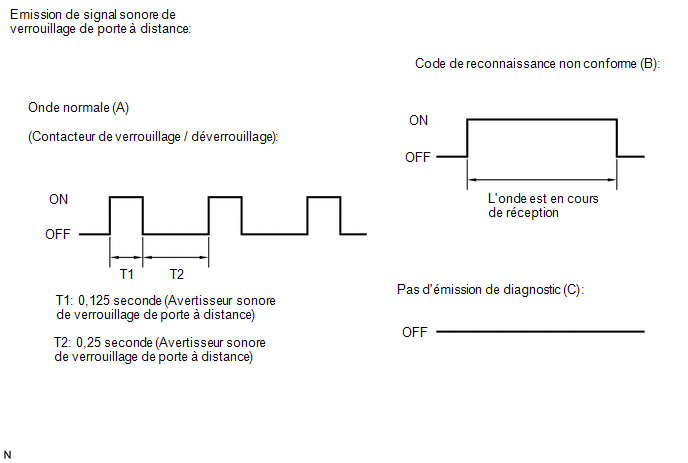 Result
Wireless door lock buzzer output | Suspected Area |
|---|---|
A |
Normal (no malfunction) |
B |
Register the electronic key transmitter assembly |
C |
Radio wave interference or malfunction of a related component |