Bluetooth® phone/audio
The following functions are made possible by the Bluetooth® wireless communication standard:
Bluetooth® audio
The Bluetooth® audio system lets you listen to files from a portable digital audio player through the vehicle's speakers via wireless communication.
This audio system is Bluetooth® compatible. Bluetooth® is a digital wireless standard that lets you play music from a portable audio player without any cable.
If your portable player is not Bluetooth® compatible, the Bluetooth® audio system cannot be used.
Bluetooth® phone (hands-free phone system)
This system is Bluetooth® compatible, which lets you make and receive calls with your mobile phone without connecting any cable and without taking your hands off the steering wheel.
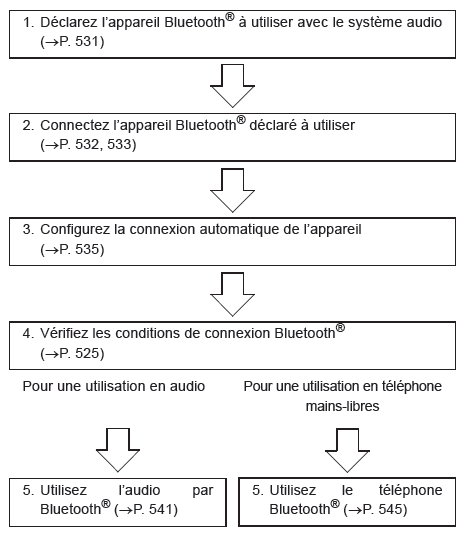
Device registration/connection flowchart
Audio system
Type A
- Bluetooth® connection conditions
If "BT" is not displayed, the Bluetooth® phone/audio cannot be used. - Displaying the setup menu
- Tune/scroll knob
Selects items such as a menu or a number
Turn: Select an option
Short press: Confirm the selected option
Long press: Display information too long to fit on the screen at once (depending on the type of Bluetooth® audio device) - Talk button
Turns the hands-free system on / makes or answers a call - End button
Turns the hands-free system off / ends, rejects a call - Speed dial selection (using the Bluetooth® phone)
- Display
Shows a message, name, number, etc.
Lowercase characters and special characters cannot be displayed.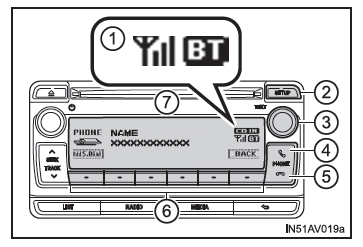
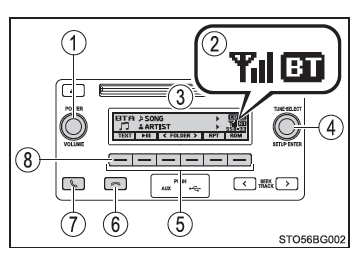
Type B
- Power/volume knob
Press: Turns the audio system on and off
Turn: Adjusts the volume - Bluetooth® connection conditions
If "BT" is not displayed, the Bluetooth® phone/audio cannot be used. - Display
A message, name, number, etc. is shown.
Lowercase letters and special characters may not be displayed. - Tune/scroll dial
Displays the setting menu or selects items (such as a menu or a number)
Turn: Selects an item
Press: Displays the setting menu and confirms the selected item - Speed dial selection (using the Bluetooth® phone)
- End call button
Ends or rejects a call with the hands-free system. - Answer call button
Answers or makes a call with the hands-free system. - Press and hold: Displays information that is too long to show on the screen at once (Bluetooth audio use)
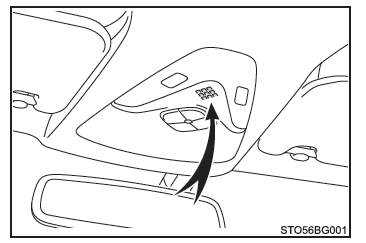
Microphone
Phone/Bluetooth audio menu list
To access a menu, press the tune/scroll dial, then browse the menus using the dial.
| First menu level | Second menu level | Third menu level | Operation details |
| "Bluetooth*" | "Pairing" | - | Registering a Bluetooth device |
| "List phone" | - | List of registered mobile phones | |
| "List audio" | - | List of registered portable audio players | |
| "Passkey" | - | Changing the passkey | |
| "BT power" | - | Turning automatic device connection on/off | |
| "Bluetooth* info" | "Device name" "Device address" | Displays the device status | |
| "Display setting" | - | Turning automatic device connection confirmation on/off | |
| "Reset" or "Initialize" | - | Resetting the settings | |
| "PHONE" or "TEL" | "Phonebook" | "Add contacts" | Adding a new number |
| "Add SD" | Storing a speed dial number | ||
| "Delete call history" | Deleting a number stored in the call history | ||
| "Delete contacts" | Deleting a number stored in the phonebook | ||
| "Delete Phonebook" or "Delete other PB" | Deleting phonebook data | ||
| "HF sound setting" | "Call volume" | Adjusting the call volume | |
| "Ring tone volume" | Adjusting the ring tone volume | ||
| "Ring tone" | Selecting the ring tone | ||
| "Transfer history" | - |
Transferring call histories |
*: Bluetooth is a registered trademark of Bluetooth SIG, Inc.
■ Bluetooth audio/phone system functions Depending on the Bluetooth device, some functions may not be available.