Removing and installing brake light switch, RHD vehicles
In this manual: Brake system
~1min read
Removing
Vehicle with diesel engine:
Remove engine cover panel → Rep. gr.10.
The fuel system is pressurised.Risk of injury due to fuel which may spurt out.Wear eye pretection.Wear protective gloves.Release pressure: place clean cloth around connection, and carefully open connection.
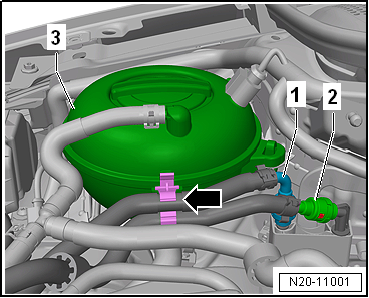
Release and pull off fuel supply lines -1- and -2-.
Separate plug-in connectors → Rep. gr.20.
Unclip fuel lines -1- and -2- from retainer -arrow- on coolant reservoir -3-.
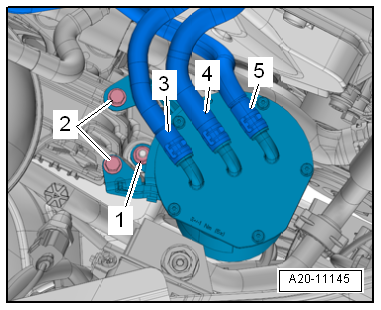
Remove securing bolts -2-.
Unscrew nut -1-.
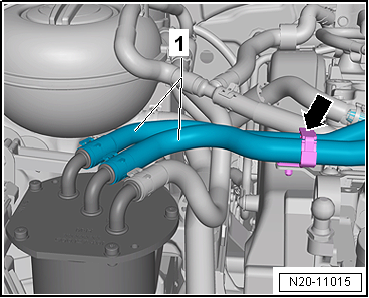
Open retainer -arrow- and unclip fuel lines -1-.
Then lay fuel filter to one side.
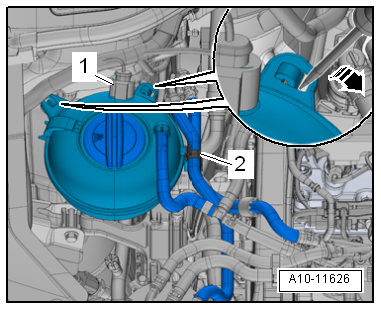
Release electrical connector -1- and pull off.
Release catches using a screwdriver -arrow-.
Place coolant expansion tank onto engine.
Remove upper toothed belt guard → Rep. gr.15.
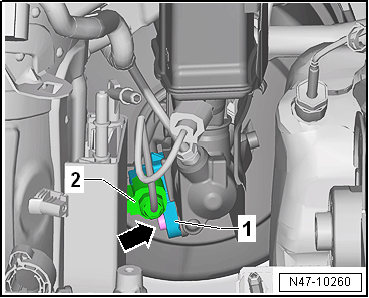
Release connector -1- and pull off brake light switch -F--2-.
Remove bolt -arrow-.
Unscrew brake light switch -F- from brake master cylinder.
Installing
Install in reverse order of removal, observing the following:
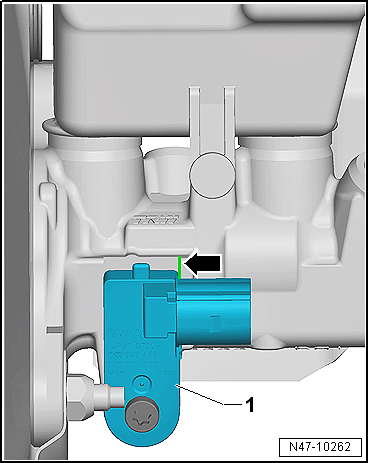
Ensure that brake light switch -F--1- seats properly on edge -arrow- of brake master cylinder.