Controllo delle luci del rimorchio
When connecting a trailer, make sure that all of the lights on the trailer are functioning before starting to drive.
Freccia del rimorchio e luci di stop
If one or more of the turn signals or brake lights on the trailer is not working, a symbol and message will be displayed in the instrument panel. The other lights on the trailer must be checked manually by the driver before the vehicle is driven.
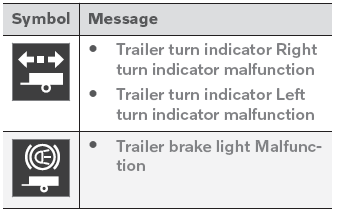
If any of the trailer's turn signal lights is not working, the turn signal symbol in the instrument panel will also flash more quickly than normal.
Luce nebbia posteriore del rimorchio
When a trailer is connected, the vehicle's rear fog light may not illuminate and rear fog light functionality is instead transferred to the trailer. If this is the case, check to see if the trailer is equipped with a rear fog light before activating the vehicle's fog lights when driving with a trailer to help ensure safe operation.
Controllo delle luci del rimorchio*
Controllo automatico
When the trailer has been connected to the vehicle's electrical system, its lights can be checked by automatically activating them. This function helps the driver check that the trailer's lights are functioning correctly before starting to drive.
Per eseguire questo controllo, il veicolo deve essere spento.
- When a trailer is connected to the towbar, the message Automatic Trailer Lamp Check will appear in the instrument panel.
- Acknowledge the message by pressing the O button on the right-side steering wheel keypad.
- Il controllo delle luci inizierà.
- Get out of the vehicle to perform the check.
- All of the lights on the trailer will begin flashing, and then illuminate separately one at a time.
- Verificare visivamente che tutte le luci del rimorchio funzionino correttamente.
- After a short time, all of the trailer's lights will start flashing again.
- Il controllo delle luci è terminato.
Disattivazione del controllo automatico
Il controllo automatico delle luci può essere disattivato sul display centrale.
- Toccare Impostazioni nella vista superiore.
- Tap My Car
 Lights and Lighting.
- Deselezionare Controllo automatico luci rimorchio.
Controllo manuale
Se il controllo automatico è stato disattivato, il controllo può essere avviato manualmente.
- Toccare Impostazioni nella vista superiore.
- Tap My Car
 Lights and Lighting.
- Selezionare Controllo manuale luci rimorchio.
- Il controllo delle luci inizierà. Scendere dal veicolo per eseguire il controllo.
* Opzione/accessorio.
Mettiti alla prova
Un breve quiz sulla Volvo XC90: ogni risposta ha una spiegazione e un link alla pagina del manuale.