Pilot Assist Displays
(Опция/аксессуар.)
(В зависимости от рынка эта функция может быть стандартной или необязательной.)
The following illustrations show how Pilot Assist can appear in the various displays in different situations.
Скорость
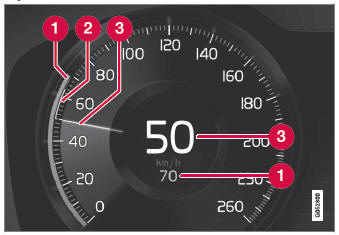
Индикаторы скорости.
 Set speed
 Speed of the vehicle ahead
 The current speed of your vehicle
Временный интервал
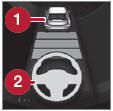 Pilot Assist will only regulate the time interval to the vehicle ahead when the distance symbol shows a vehicle (1) over the steering wheel symbol.
Pilot Assist's steering assistance is only active when the steering wheel symbol (2) changes from GRAY to GREEN.
При вождении
In the following illustration, Road Sign Information (RSI1) indicates that the maximum permitted speed is 130 км/ч.
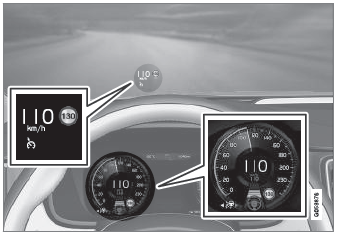
The previous illustration shows that Pilot Assist is set to maintain a speed of 110 км/ч and that there is no target vehicle ahead to follow.
Pilot Assist will not provide any steering assistance because it cannot detect the lane's side marking lines.
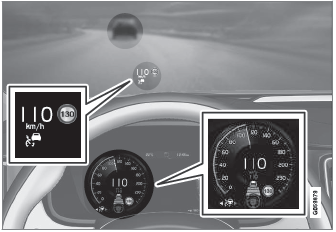
The previous illustration shows that Pilot Assist is set to maintain a speed of 110 км/ч and is following a target vehicle ahead that is traveling at the same speed.
Pilot Assist will not provide any steering assistance because it cannot detect the lane's side marking lines.
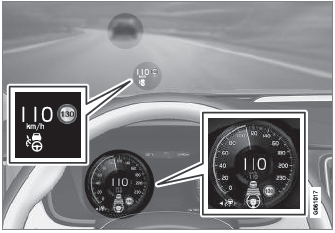
The previous illustration shows that Pilot Assist is set to maintain a speed of 110 км/ч and is following a target vehicle ahead that is traveling at the same speed.
In this example, Pilot Assist will also provide steering assistance because it can detect the lane's side marking lines.
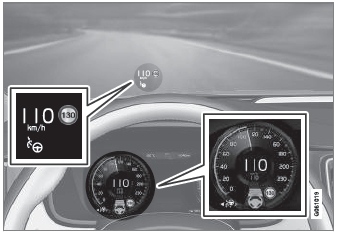
The previous illustration shows that Pilot Assist is set to maintain a speed of 110 км/ч and that there is no target vehicle ahead to follow.
Pilot Assist will provide steering assistance because it can detect the lane's side marking lines.
1 Информация о дорожных знаках
Проверьте себя
Короткий тест по Volvo XC90: после ответа — пояснение и ссылка на страницу руководства.