Круиз -контроль
Cruise Control (CC1) can help the driver maintain an even speed to provide a more relaxing driving experience on highways and long, straight roads with even traffic flows.
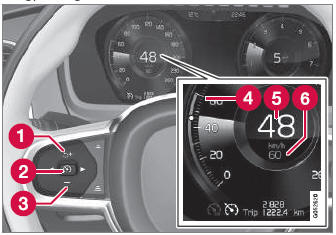
Функциональные кнопки и символы

 : Activates Cruise Control from standby mode and resumes the set speed

 : Increases the set speed

 : Из режима ожидания – activates Cruise Control and sets the current speed

 : Из активного режима – deactivates/puts Cruise Control in standby mode

 : Reduces the set speed
 Marker for set speed
 The vehicle's current speed
 Set speed
- The function is supplementary driver support intended to facilitate driving and help make it safer – it cannot handle all situations in all traffic, weather and road conditions.
- The driver is advised to read all sections in the Owner's Manual about this function to learn of its limitations, which the driver must be aware of before using the function.
- Driver support functions are not a substitute for the driver's attention and judgment. The driver is always responsible for ensuring the vehicle is driven in a safe manner, at the appropriate speed, with an appropriate distance to other vehicles, and in accordance with current traffic rules and regulations.
Использование торможения двигателя вместо применения тормозов
Круиз -контроль регулирует скорость, слегка применяя тормоза. On downgrades, it can sometimes be desirable to roll a bit faster and let speed be reduced instead by engine braking alone. The driver can temporarily disengage the Cruise Control braking function.
Чтобы отказаться от CC:
- Press the accelerator pedal about halfway down and then release it.
- Cruise Control will automatically disengage the automatic brake function and speed will only be reduced using the engine braking function.
1 Круиз -контроль
2 Адаптивный круиз -контроль
Проверьте себя
Короткий тест по Volvo XC90: после ответа — пояснение и ссылка на страницу руководства.