Установка интервала времени на автомобиль впереди
The time interval to the vehicle ahead can be set for the functions Adaptive Cruise Control*, Pilot Assist* and Distance Alert*.
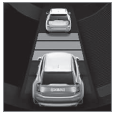 Different time intervals to the vehicle ahead can be selected and are shown in the instrument panel as 1–5 horizontal bars. The more bars, the longer the time interval. One bar represents an interval of approx. 1 second to the vehicle ahead. 5 bars represents approx. 3 seconds.
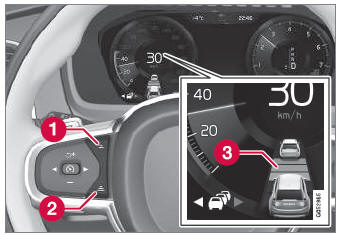
Управление для установки интервала времени.
 Reduce the time interval
 Increase the time interval
 Distance indicator
- Press the (1) or (2) button to decrease or increase the time interval.
- Индикатор расстояния (3) показывает текущий интервал времени.
In order to help your vehicle follow the vehicle ahead as smoothly and comfortably as possible, Adaptive Cruise Control allows the time interval to vary noticeably in certain situations. At low speeds, when the distance to the vehicle ahead is short, Adaptive Cruise Control increases the time interval slightly.
- The greater the vehicles' speed, the greater the distance between them for a set time interval.
- Используйте только интервалы времени, разрешенные местными правилами трафика.
- If driver support does not seem to respond with a speed increase when activated, it may be because the time interval to the vehicle ahead is shorter than the set time interval.
- Используйте только интервал времени, подходящий для текущих условий движения.
- The driver should be aware that short time intervals give them limited time to react and act to any unforeseen traffic situation.
* Опция/аксессуар.
Проверьте себя
Короткий тест по Volvo XC90: после ответа — пояснение и ссылка на страницу руководства.