Активация и деактивирование дисплея с головой
(Опция/аксессуар.)
The head-up display can be activated and deactivated when the vehicle has been started.
 Press the Head-Up Display button in the center display's Function view. An indicator light in the button will illuminate when the function is activated.
Настройки отображения головы
Настройка настроек для отображения головки.
Settings can be adjusted when the vehicle is started and a projected image is displayed on the windshield.
Выбор параметров отображения
Выберите функции, которые будут показаны на дисплее Headup.
- Tap Настройки in the center display's Top view.
- Tap My Car
 Displays
 Head-Up Display Options.
- Select one or more functions:
- Показать навигацию
- Показать информацию о дорожных знаках
- Показать поддержку драйвера
- Показать телефон
Эта настройка хранится как личная настройка в профиле драйвера.
Регулирование яркости и положения высоты

- Press the Настройки дисплея button in the center display's Function view.
- Adjust the brightness of the projected image and the height position in the driver's field of vision using the right-side steering wheel lever.
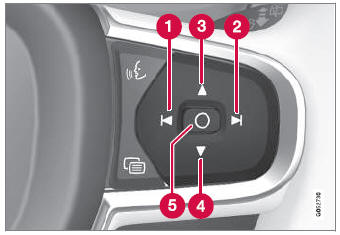
 Decreasing brightness
 Increasing brightness
 Raising position
 Lowering position
 Confirm
The brightness of the graphic is automatically adapted to the light conditions in its background. Brightness is also affected by adjustments to the brightness of the other displays in the vehicle.
The height position can be stored in the front power seat's* memory function using the keypad in the driver's door.
Калибровка горизонтального положения
If the windshield or display unit has been replaced, the head-up display's horizontal position may need to be calibrated. Calibration means that the projected image is rotated clockwise or counterclockwise.
- Tap Настройки in the center display's Top view.
- Select My Car
 Displays
 Head-Up Display Options
 Head-Up Display Calibration.
- Calibrate the horizontal position of the image using the right-side steering wheel keypad.
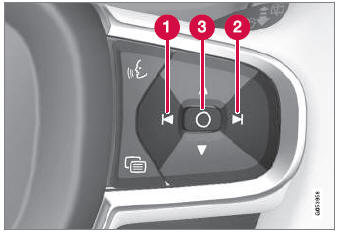
 Rotate counterclockwise
 Rotate clockwise
 Confirm
* Опция/аксессуар.
Проверьте себя
Короткий тест по Volvo XC90: после ответа — пояснение и ссылка на страницу руководства.