Activación y desactivación de la pantalla de visualización frontal
(Opción/accesorio.)
The head-up display can be activated and deactivated when the vehicle has been started.
 Press the Head-Up Display button in the center display's Function view. An indicator light in the button will illuminate when the function is activated.
Ajustes de la pantalla de visualización frontal
Ajuste de la configuración de la pantalla de visualización frontal.
Settings can be adjusted when the vehicle is started and a projected image is displayed on the windshield.
Selección de opciones de visualización
Seleccione las funciones que se mostrarán en la pantalla de visualización frontal.
- Pulse Ajustes en la vista superior de la pantalla central.
- Tap My Car
 Displays
 Head-Up Display Options.
- Select one or more functions:
- Mostrar navegación
- Mostrar información de señales de tráfico
- Mostrar asistencia al conductor
- Mostrar teléfono
Este ajuste se guarda como ajuste personal en el perfil del conductor.
Ajuste del brillo y de la posición en altura

- Pulse el botón Ajustes de pantalla en la vista de funciones de la pantalla central.
- Adjust the brightness of the projected image and the height position in the driver's field of vision using the right-side steering wheel lever.
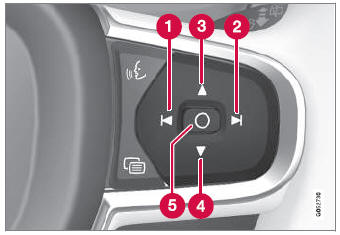
 Decreasing brightness
 Increasing brightness
 Raising position
 Lowering position
 Confirm
The brightness of the graphic is automatically adapted to the light conditions in its background. Brightness is also affected by adjustments to the brightness of the other displays in the vehicle.
The height position can be stored in the front power seat's* memory function using the keypad in the driver's door.
Calibración de la posición horizontal
If the windshield or display unit has been replaced, the head-up display's horizontal position may need to be calibrated. Calibration means that the projected image is rotated clockwise or counterclockwise.
- Pulse Ajustes en la vista superior de la pantalla central.
- Select My Car
 Displays
 Head-Up Display Options
 Head-Up Display Calibration.
- Calibrate the horizontal position of the image using the right-side steering wheel keypad.
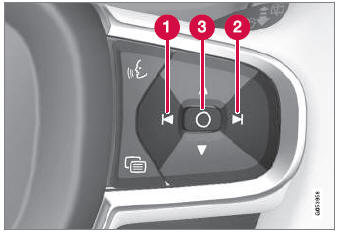
 Rotate counterclockwise
 Rotate clockwise
 Confirm
* Opción/accesorio.
Pon a prueba tus conocimientos
Un test rápido sobre el Volvo XC90: cada respuesta trae una explicación y un enlace a la página del manual.